TempSMSScan be opened in various monitor devices without any issues such as desktops, laptops and mobile devices.
電話番号なしで電報を作成するスリリングな方法 5
2- Choose a Country
On the main page of the TempSMSS website, you can see the different flags of some most popular countries like the私たち、 イギリス、 カナダ、 スウェーデンandフランス. Choose one of them as per your request.
3- Find a Number
After choosing a Country, you have to find and select a proper number which you are seeing in the list of the numbers.
電話番号なしで電報を作成するスリリングな方法 6
4- Enter the Number in Telegram
Later on, Copy the number in the TempSMSS website and enter it in the Telegram account registering page then press Submit and wait for the message to be received.
This post will explain how the TempSMS verification service can allow you to register Gmail accounts without using your personal phone number andcreate an unlimited number of accounts。
When registering on Gmail, you must submit a phone number to which an SMS with a verification code will be sent.
The user is required by the company’s guidelines to associate a phone number with each different account. A Google profile grants access to a number of services, including Gmail, Google Play, and Google Maps.
The ability to utilize a personal phone number is not appropriate for every user. Some people require many personas, while others simply do not want to jeopardize their privacy.
One approach solves both problems: Google rents virtual numbers.
Mobile number for Gmail Account verification
Thetempsmss.comservice allows you to create accounts on the most popular websites like Gmail, Facebook, Instagram, Telegram, and other mobile applications without providing your personal mobile number.
It works by the user discovering free temporary numbers, entering them during page registration, and receiving an SMS with a verification code.
These numbers are less expensive than real SIM cards. For example,カナダ, Sweden, the United States, France, and all other nations have no entry fees.
You can use our numbers as many times as you like. For example, you want to create two Gmail accounts: one for your personal use and the other one for your business use.
Then you’ll need two Google accounts and two disposable phone numbers. The entire process, including number acquisition, should take a few minutes. Rep the steps in the instruction in the following subsection.
Create more than one Gmail account in 5 steps
To obtain a free virtual number and complete account registration on Gmail, follow the step-by-step instructions.
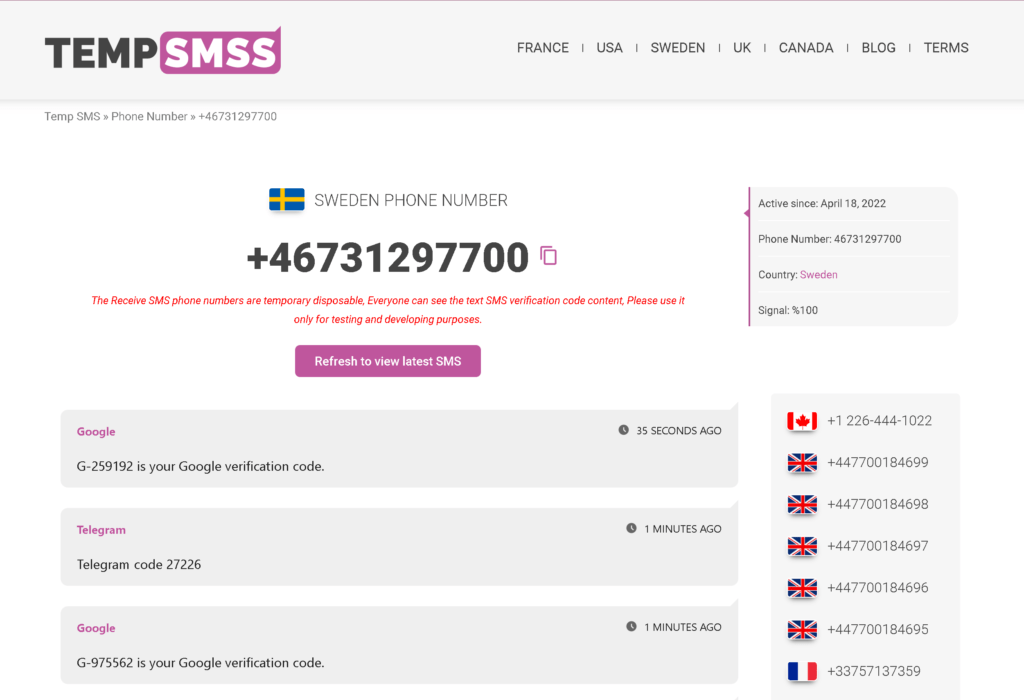
1- Openwww.tempsmss.comand choose the country which you want to get a number from.
2- Get a Disposal phone number from the list.
3- Copy the temporary phone number by clicking oncopyicon.
4- Paste and use it while reregistering your Gmail account..
5- Then come back to the tempsmss.com website and refresh the page. You will see that your received SMS verification code is there.
Have you ever thought of creating another GeeGee.net account to use and benefit from the website? In this article we showed how to register a new account on geegee.net In the following video tutorial. By using Temp Number you can get your new GeeGee account instantly.
What is GeeGee.net?
GeeGee‘s main focus is on gaming monetization and money gamification.
The platform will be a subscription-based web service that connects and monetizes all users and content across all social media and content-hosting platforms.
We want to provide a viable alternative to the present industry models.
Why create a second account with temp numbers?
You might be wondering why we don’t mind if you create a fake GeeGee account, especially if you’re selling something on GeeGee or have a business account.
Here are a few reasons why creating a false account is preferable.
Privacy (Makes You Anonymous)
Protecting your privacy is one of the most serious concerns facing the general public in today’s digital environment. When you provide private info, such as your real phone number, you risk identity theft, cyberstalking, and other unwelcome attention.
You may protect yourself from all of this and more by using disposable phone temp numbers for SMS when signing up for internet services.
Suitable (It is Convenient)
The secret to using tempsms and temp numbers is that they are simply that: temporary and disposable. You use one if you need it – say, to create an account on the internet – and then put it away when you don’t.
Because of their short duration, these numbers will expire soon after the service you requested is finished. Do you require a different phone number for future sign-ups? Simply acquire a new phone number!
No Spam (Removes Spam)
For better or worse, once you give a corporation your mobile number, you are on their mailing list. Some companies’ terms of service allow them to utilize your personal information for marketing reasons.
In the real world, this translates to a never-ending barrage of spam texts delivered directly to your phone. Your phone number may be shared with third parties in some instances (again, as you permitted when agreeing to their terms of service).
You’ll never have to worry about follow-up marketing with a throwaway temp number for SMS.
Globally Accepted (Recognized Worldwide)
Many providers don’t bother to check if the phone number you offer is for a real phone or a virtual mailbox. If you obtain their verification code, you will be able to proceed to their main site without any additional obstacles.
You can use our tempsms online to receive temporary SMS to sign up for some of the world’s most popular internet services.フェイスブック、電報、Instagram, WhatsApp, Webmoney, Twitter, Gmail, Baidu, Amazon, Tinder, Chatroulette, eBay, LinkedIn, and other social media platforms are among them.
Create GeeGee account by a temp number in 2 mins 14
Is tempsmss.com good to use?
Usingテンプズムwebsite is a financially savvy and secure method for safeguarding yourself on the web.
It is set up for a brief time (typically just a month or two) to allow you to satisfy any service provider verification requirements.
After then, the temp number is no longer active, which means no further SMS correspondence from the provider or a third-party.