US Temporary Phone Numbers: Your Ultimate Guide in 2024

In an era where online privacy is of utmost importance, safeguarding your personal information has never been more critical. Whether you’re signing up for social media platforms, online dating apps, or various websites and services, providing your mobile number can be a risk. This is where US Temporary Phone Numbers come to your rescue.

What are US Temporary Phone Numbers?

US Temporary Phone Numbers are virtual phone numbers that allow you to receive SMS messages without revealing your actual mobile number. They are the go-to solution for maintaining your online privacy while accessing a multitude of online services and applications. These disposable numbers are gaining popularity for their convenience and security features.

Why Use US Temporary Phone Numbers?

  1. Enhanced Privacy: Your personal phone number is a treasure trove of information. By using a temporary number, you shield your primary contact information from potential risks such as spam calls, identity theft, and data breaches.
  2. Avoiding Verification Hassles: Many online platforms require SMS verification during the registration process. With a temporary US number, you can easily receive verification codes, allowing you to create accounts without any hassles.
  3. Global Accessibility: Regardless of your location, you can access US Temporary Phone Numbers from anywhere in the world. This global accessibility makes them ideal for international users.

How to Use US Temporary Phone Numbers

Using US Temporary Phone Numbers is incredibly straightforward:

  1. Visit a Provider: There are several online platforms that offer free US Temporary Phone Numbers. One such platform is tempsmss.com.
  2. Select a Number: Browse the available list of US Temporary Phone Numbers on the platform and choose one that suits your needs.
  3. Receive SMS Messages: Once you’ve selected a number, you can start receiving SMS messages on that number. These messages can include verification codes, one-time passwords, or any other information you need for online registration.
  4. Copy and Paste: Retrieve the SMS verification code from the list of messages associated with your temporary number. You can then copy and paste this code into the verification form on the website or app you’re signing up for.

Popular Use Cases for US Temporary Phone Numbers

US Temporary Phone Numbers have a wide range of applications. Here are some of the most common use cases:

  1. Social Media: Sign up for platforms like Facebook, Instagram, and Twitter without revealing your personal number.
  2. Online Dating: Maintain your privacy while using dating apps like Tinder and Bumble.
  3. Messaging Apps: Register for messaging apps like WhatsApp, Telegram, and WeChat without exposing your primary contact information.
  4. Online Shopping: Use temporary numbers to receive verification codes for online shopping sites, such as Amazon or eBay.
  5. Account Recovery: Ensure the security of your accounts by using these numbers for account recovery purposes.

SEO-Friendly Keywords

To make this article SEO-friendly, we’ve strategically incorporated some of the most searched keywords on Google, which are bolded for your convenience:

  • US Temporary Phone Numbers
  • Online Privacy
  • Disposable Phone Numbers
  • Receive SMS Online
  • SMS Verification Codes
  • Online Security
  • Online Registration
  • Temporary Phone Numbers for Apps
  • Online Privacy Protection

In conclusion, US Temporary Phone Numbers are an invaluable tool for safeguarding your online privacy. With the ever-increasing risks associated with sharing personal information online, these numbers offer a reliable and secure solution. Protect your identity, reduce spam, and enhance your online experience with the use of temporary phone numbers.
Unlock Online Privacy with France Temporary Phone Numbers 2024

In today’s digital age, protecting your online privacy is of utmost importance. Whether you’re signing up for a new app, website, or social media platform, you often find yourself sharing your personal phone number for verification purposes. But what if there was a way to keep your mobile number private while still enjoying the convenience of online services? That’s where France Temporary Phone Numbers come into play.

The Power of France Temporary Phone Numbers

France Temporary Phone Numbers provide a valuable solution to safeguarding your privacy online. At tempsmss.com, we offer a free and convenient service that allows you to receive temporary SMS messages without creating an account. Here’s why these numbers are becoming increasingly popular:

1. No Registration Required

Say goodbye to lengthy registration processes and sharing your personal information. With France Temporary Phone Numbers, you can receive SMS messages instantly, hassle-free.

2. Versatile Usage

Our temporary numbers can be used for a wide range of online services, including Instagram, Facebook, Vk.com, Telegram, Imo, WeChat, PayPal, and many others. Whether you’re signing up for a social media account or verifying an app, these numbers have you covered.

3. Global Accessibility

No matter where you are in the world, you can access France Temporary Phone Numbers. This means you can receive SMS verifications for French-based services from anywhere on the planet.

4. Enhanced Privacy

By using a temporary number, you can shield your actual phone number from prying eyes. This ensures that your personal information remains confidential and protected from potential security breaches.

5. Quick and Easy Verification

The process is as simple as selecting a temporary number from tempsmss.com, using it for verification, and retrieving the verification code from the list of messages associated with that number. Copy and paste the code, and you’re good to go.

How to Use France Temporary Phone Numbers

Using France Temporary Phone Numbers is a straightforward process:

  1. Visit tempsmss.com on your web browser.
  2. Choose a temporary number from the list of available options.
  3. Use this number to sign up for the app, website, or service of your choice.
  4. Return to tempsmss.com to access the verification code sent to the temporary number.
  5. Copy and paste the code into the SMS verification form.
  6. Enjoy the benefits of enhanced privacy and security.

Conclusion

In an era where online privacy is paramount, France Temporary Phone Numbers offer a simple yet effective way to protect your personal information. Whether you’re signing up for social media platforms, messaging apps, or any other online services, these numbers ensure that your real phone number remains confidential. Plus, our service at tempsmss.com is entirely free and accessible from anywhere in the world.

Don’t compromise your privacy online; start using France Temporary Phone Numbers today to keep your personal information safe and secure. Your online privacy matters, and with this innovative solution, you can browse the web with confidence.

Receive Online SMS from Temp Sweden Numbers

Sweden is a country with a high level of technology adoption, making it a convenient place to receive online SMS messages. There are a variety of options available for receiving online SMS from temporary Sweden numbers, which can be useful for a variety of purposes such as verifying accounts, receiving notifications, or conducting business.

Receiving Temporary SMS Options

One option for receiving online SMS from temporary Sweden numbers is to use a virtual phone number service. These services provide virtual phone numbers that can be used to receive SMS messages online. Many of these services offer temporary phone numbers that can be used for a limited time, such as a few days or weeks. This can be useful for situations where you need a temporary phone number for a specific purpose, such as verifying an online account or receiving notifications. One example of a service that offers temporary Sweden phone numbers is tempsmss.com.

Receive Temporary SMS via SIM card

Another option for receiving online SMS from temporary Sweden numbers is to use a SIM card from a Swedish mobile provider. Many mobile providers offer prepaid SIM cards that can be purchased and used for a limited time. These SIM cards can be used to receive SMS messages in Sweden, allowing you to use your phone or other device to receive messages while you are in the country.

Receive Temporary SMS via Tempsmss.com

There are a number of other options available for receiving online SMS from temporary Sweden numbers, including using a forwarding service or setting up a virtual private network (VPN). These options may be more complex to set up, but can offer additional features such as the ability to send SMS messages as well as receive them. For example, tempsmss.com offers a variety of forwarding options that can be used to receive online SMS messages in Sweden.

Drawbacks and Benefits

Overall, there are a number of options available for receiving online SMS from temporary Sweden numbers, each with its own benefits and drawbacks. By considering your specific needs and the features offered by different options, you can choose the solution that is best suited to your needs. Whether you are looking for a simple solution like a virtual phone number service or a more comprehensive option like a forwarding service, there is likely a solution available that can meet your needs.

One of the benefits of using a temporary Sweden phone number to receive online SMS messages is the ability to keep your personal phone number private. This can be especially useful for situations where you do not want to share your personal phone number with others, such as when using online dating or job search websites. By using a temporary phone number, you can protect your personal phone number and keep your communication separate from your personal life.

Another benefit of using a temporary Sweden phone number is the ability to use it for a specific purpose and then discard it when it is no longer needed. This can be useful if you only need a phone number for a short period of time, such as for a temporary job or project. After the project is completed, you can simply stop using the temporary phone number and move on to other things.

In addition to virtual phone number services and prepaid SIM cards, there are a number of other options available for receiving online SMS from temporary Sweden numbers. For example, some services offer the ability to receive SMS messages through a web-based interface or via email. This can be a convenient option if you do not have a physical phone or device to receive the messages on, or if you prefer to receive your messages in a different format.

receiving online SMS from temporary Sweden numbers
Receiving online SMS from temporary Sweden numbers

Another option for receiving online SMS from temporary Sweden numbers is to use a messaging app that supports temporary phone numbers. Many messaging apps, such as WhatsApp or Signal, offer the ability to use temporary phone numbers for messaging. This can be a convenient option if you already use a messaging app for communication and do not want to switch between multiple apps or phone numbers.
Summary

Finally, it is important to keep in mind that some online services may not allow the use of temporary phone numbers or may have restrictions on how they can be used. For example, some services may require you to use a phone number that is tied to a specific country or region. It is a good idea to check the terms of service for any online service you plan to use to ensure that you are able to use a temporary phone number if needed.

I hope these additional paragraphs provide additional information and context about receiving online SMS from temporary Sweden numbers. If you have any further questions or would like more information on this topic, please let me know.

Receive SMS from Finland Temporary Numbers

Receive SMS with Finland Temporary Numbers

SMS is a great way to keep in touch with your loved ones during long periods of separation. But what if you need to text from a Finland temporary number? This can be tricky, since many SMS services don’t work internationally. Luckily, there are several services that allow you to send and receive SMS from Finland temporary numbers without any trouble. In this blog post, we will outline the best of these services and how to use them.

What is Temporary Numbers for SMS?

Temporary numbers for SMS are numbers which can be used to send and receive SMS messages from Finland. These temporary numbers are typically valid for a short period of time, and they will be automatically cancelled once the timer has run out. If you need to send or receive a message using a temporary number from Finland, it is best to use one of the following services:

Temp SMSS – This service allows you to track the status of your SMS messages, and it also provides information about the sender and recipient of each message. You can also view your sent and received SMS messages history.

Also allows you to receive SMS messages as well as make phone calls using pre-paid minutes. You will need to sign up for a free trial account in order to use this service.

How does Temporary Numbers work?

If you are in Finland and want to receive SMS messages from abroad, you can use a Temporary Number. A Temporary Number is a phone number that is only valid for a certain amount of time. The duration of the number’s validity can be determined by the provider. After the number has expired, it will stop working and no longer be able to send or receive SMS messages.

To get a temporary number in Finland, you first need to sign up with an international provider like Skype or Viber. Once you have registered, you will need to enter your mobile phone number and the country where you would like to receive messages. You will then be given a Temporary Number that is valid for a set amount of time.

When your Temporary Number expires, it will stop working and no longer be able to send or receive SMS messages. You can keep track of when your Temporary Number expires by visiting the provider’s website or by checking your notifications panel on your phone.

How to receive SMS from Finland Temporary Numbers

If you need to send or receive SMS from Finland, but don’t have a Finnish phone number, here are some options:

1) Use a one of our website numbers that supporting receiving SMS. Check with your service provider to see if they offer a Finnish SMS service.

2) Try using an online service such as Skype or WhatsApp. Just add “Finland” as the country in your contacts list and you’ll be good to go!

3) Use a forwarding service to forward your Finnish phone number to another phone. This is usually done through an app like WhatsApp or Skype, so just search for “forwarding Finland” in your app store.

4) Rent a temporary Finnish phone number. This can be done through services like tempsmss.com or Finnline services. These services will provide you with a Finnish phone number and all the necessary instructions to use it.

Conclusion

Do you want to be able to receive SMS messages from Finland’s Temporary Numbers? If so, then you’ll need a SIM card from Finnish operator DNA. You can find out more about receiving SMS messages from Finland’s Temporary Numbers on their website or by calling them.

Temporary Numbers and Benefits of Receiving SMS from

You can maintain your privacy while also ensuring the security of your online account by using our website’s Receive SMS service. We offer a safe and free way to obtain a temporary phone number for SMS or OTP verification.

Why Are Temp Numbers Used for SMS Verification?

The popularity of SMS verification has increased, but so have the difficulties that have resulted from it.

You have to have faith in the other party to give them your personal contact information if you allow SMS verification without using a phone.

There are numerous ways in which this could expose you.

Real SIM Numbers are a more expensive method of getting a temporary phone number than other options, but some people use them for SMS verification.

I believe that receiving SMS has a more powerful remedy for the issue.

What is the justification for businesses’ insistence on SMS Online verification?

These days, numerous companies are seriously concerned about information security breaches.

Data breaches could almost completely ruin a company’s reputation, because they are valuable.

So rather than taking the opportunity on cybersecurity incidents, the majority of organizations have added SMS verification as an extra measure of security.

SMS verification is indeed not one hundred percent trustable.

SMS verification is not always trustworthy. Just because a company uses SMS verification somehow doesn’t mean that data security risks are eliminated.

However, it does give businesses a legitimate argument in the event that critical data is exposed as a result of a data breach.

Skipping SMS verification is potentially possible?

Unfortunately, just about all entities will just not permit you to “opt out” of SMS validation.

Feel free to keep my mobile phone number in your address book, and I wish you the best of luck.

Receive SMS can provide users with such a secure, short lived mobile number to replace your current phone number.

Please, try not to involve your telephone for SMS confirmation.

Organizations might be satisfied with SMS verification, however it doesn’t suggest that their shoppers are as satisfied.

Coming up next are instances of techniques through which people can do this:

  • Buying a burner telephone or an expendable telephone
  • Utilizing a contraption claimed by a companion or relative
  • Looking on the Internet for “temp phone numbers for SMS verification“
  • Utilizing Google Voice to speak with others

Potential Problems With SMS Verification in temporary numbers

Several aspects could just go factually incorrect while using a service apart from receiving SMS to verify SMS messages.

An example might well be:

The utilization of sites on the internet providing free temporary phone numbers is expressly forbidden on some social networking sites, including Facebook.

You might not receive the code if you already have your phone’s do not disturb functionality activated or if you don’t  have an internet connection.

Certain solutions might not send the verification code once they guarantee.

A few of those applications for fake mobile numbers are unsafe, but others might collect and sell your personally identifiable information. When using these apps, use caution.

By using tempsmss.com, you’ll have the option to check SMS without having a telephone

With tempsmss.com, you’ll be able to get for digital services or indeed confirm SMS without the need for a mobile by using our temporary phone numbers opportunity.

The steps listed below should be followed:

  1. To get a new SMS receiver number, explore the main website then click on a country.
  2. Choose the number from a country you wish to get SMS from.
  3. As soon as you need to, start using your new temporary phone number. The attributed mobile number is abruptly cancelled and the text message is deleted after a minute.
  4. From the drop-down menu, choose “receive a temporary SMS” as a result, received SMS will show up in the page and it can only be used once before being tried to replace.

What else is available in tempsmss.com, besides this?

A suitable technique of information exchange is text messaging, especially for fast and easy messages or dialogues that don’t call for the use of a phone.

However when you want to text someone and you don’t have your phone with you, the issue emerges.

You might also not even have a phone contract or dislike using a smartphone’s keyboard because it is too tiny for you.

In any case, it might even be useful to know how to receive text messages on a laptop.

Fortunately, you have access to some tools that will help you with just this project.

Discover more by having read on.

There are several options for receiving messages out of your device, regardless of whether you don’t have a prepaid sim card or need to do so.

By choosing a few of the aforementioned options, you can  receive  texts quickly and easily without a phone.

You need a temporary number for verification your Twitter? 2022

Do you want to register a second Twitter account, but it requires an SMS verification? Do you not have access to a phone or prefer not to use your personal number?

Use TempSMS’s “Temporary number to receive SMS” service! You’ll get a free virtual phone number. You can use it for registration and you won’t have to pay anything.

When registering on a website, you may be asked to provide your mobile phone number. It’s possible that you’ll end up with a slew of text messages later. We’ll assist you in registering on any website without having to give out your real phone number. You won’t have to be concerned about your real phone number. We’ll keep you safe from spam and unwelcome advertising.

Register for a Twitter account without a phone number

You don’t have to give Twitter your phone number just yet if you want to sign up. Check out this tutorial on how to make a Twitter account without using your phone number:

  • Visit the Twitter signup page.
  • Click on “Sign up with phone or email” button.
  • Fill in your name here.
  • Under Phone, select Use Email Instead.
  • Tap Next after entering your date of birth.
  • Hit Sign Up button.
Receive Temp SMS - image 2022 06 21 145722382
Twitter Sign Up Page

Instead of sending a verification code to your phone, Twitter sends it to your email address. You simply enter the code and click “Sign Up” and you’re done.

Unfortunately, Twitter’s attempt to obtain your phone number may not be over yet. Many users who haven’t entered their phone number claim that Twitter has locked them out of their accounts and that phone number requests keep popping up.

Don’t worry — we’ll walk you through all of your options so you can avoid revealing your phone for good.

Why is Twitter requesting your phone number?

Twitter, like many other social media platforms, claims to require your phone number for your own benefit. The following are some of the reasons for requiring users’ phone numbers:

  1. Identity verification
  2. demonstrating that you are not a robot
  3. Maintaining the security of your account
  4. Resetting your password is simple.
  5. assisting your friends in locating your account
  6. Using Twitter to communicate with your phone contacts
  7. Using security features such as two-factor authentication
  8. Making it difficult for spammers and suspicious accounts to continue operating

How can I get an SMS verification code from Twitter online?

  1. Navigate to our website’s main page to begin receiving SMS online.
  2. Choose the desired country and look for the service number in the list.
  3. Make a note of the temporary number that appears there. Copy it and paste it into the appropriate field in the verification window before sending the SMS code.
  4. You’ll receive a code to confirm your Twitter registration in a few seconds. The text message will appear next to your phone number.

How to receive SMS for free?

We do not have any paid phone numbers, so all of the numbers on our website are free. People contact us every day looking for paid SMS numbers.

We always decline their requests because we value our own telephone numbers. We want to work in a long-term manner. However, we run promotions and give out promo codes through our Telegram channel.

Verification Twitter Registration tempsmss.com

A temporary number protects your online privacy

Use TempSMSs.com instead of your personal or work phone number online to protect your online privacy! Other websites can also send text messages to our SIM card numbers.

Countries have dedicated SMS verification numbers:

CountryLink
USView US temp numbers
UKView UK temp numbers
FranceView French temp numbers
SwedenView Swedish temp numbers
CanadaView Canadian temp numbers

Can I create LINE account without verify my personal number?

The Line Mobile Application, abbreviated as LINE, is a freeware app for instant messaging on electronic devices such as smartphones, tablets, and desktop computers.

Line users can send and receive text, images, video, and audio, as well as hold free VoIP calls and video conferences. Line is also a platform that offers a variety of services such as a digital wallet (Line Pay), news (LINE Today), video on demand (Line TV), and digital comic distribution (Line Manga and Line Webtoon).

Line Corporation, a Tokyo-based subsidiary of Softbank Group, and Naver Corporation, based in Seoul, operate the service. NHN Japan, a subsidiary of Naver Corporation, launched Line in Japan on June 1, 2011.

Because it was made to Japanese consumers’ tastes and offered free smartphone calls and texting, it quickly outpaced its existing rival KakaoTalk Messenger for the Japanese market with the help of a massive marketing campaign.

Within 18 months, it had 100 million users, and six months later, it had 200 million users. With over 300 million users, Line became Japan’s largest social network in 2013. It had 600 million users as of February 2015.

Line now supports English in addition to Japanese. This software is critical for businesses looking to enter the Japanese market. Use the service to receive SMS online to register an account in the messenger without a phone number.

Features of the App

LINE is a program that runs on a variety of platforms and can be accessed from multiple computers Microsoft Windows and MacOS. The application will also allow you to sync your address book.

This app also allows users to add friends by scanning QR codes with Line ID and shaking their phones at the same time. To make it easy for users to communicate, the application has a direct pop-out message box for reading and replying. It can also send current or specific locations, voice audios, emojis, stickers, and emoticons to friends, as well as share photos, videos, and music with other users.

In addition, the app allows users to make free voice and video calls. Users can also chat and share media in groups of up to 500 people by creating and joining them. Users can also post, like, and comment on bulletin boards in chat rooms. Users can also add pictures, text, and stickers to their homepages using the timeline and homepage features of this app. Users can also change their Line theme to one of the free themes Line offers in the theme shop, or purchase other popular cartoon characters. Line also has a Snap movie feature that allows users to record a stop-motion video with provided background music.

When messages are sent and received, users can see a real-time confirmation or use a hidden chat feature, which hides and deletes a chat history (from both involved devices and Line servers) after a period of time set by the user.

History of the LINE App

Line is a popular messenger app in Japan that was created in South Korea. It is now used by 86 million Japanese people, and the number is growing by the month.

Line was founded in 2011 in response to the tsunami that struck Japan. The developers wanted to provide people with a dependable connection during various natural disasters that occur in the land of the rising sun.

Over the course of its ten-year existence, the software has evolved into a multitasking application: the developers have set a new goal: to improve the program so that people can create infrastructures, i.e., exchange videos and photos in addition to text messages.

In 2022, Line is referred to as a super application that, like a Swiss knife, combines functions:

  • Official channels
  • Stickers
  • Games
  • Line Pay
  • Line Taxi
  • Line Wow
  • Line Today
  • Line Shopping

Is the LINE App secure enough?

  • Line provides end-to-end encryption if users opt in – the app refers to it as “Letter Sealing.”
  • You can sign up for the app using your phone number or your Facebook account.

Using a secure chat app to communicate with others keeps you safe from malicious actors attempting to steal your data. Different apps have different security and functionality features, so which one you use will be determined by which features are most important to you.

Don’t use your personal phone number to Create LINE

Line appears to be similar to the majority of social media platforms. Users can create profiles and channels, add friends, make phone calls, and chat here. Aside from text recordings, videos, and photos, Instagram Stories allows users to create their own stories. People on Line have more options than on other social networks: they can order delivery, taxi, make a doctor’s appointment, get banking products, buy vouchers, read news, listen to music, play games, and view and give announcements. The list of possibilities is extensive in general.

Line has been tailored for business, and over 3 million businesses have already signed up to use it. The software allows you to send up to 500 promotional messages per month and provides analytics.

Ordinary and smart people do not want to be registered with a real phone number. When there are virtual numbers for SMS verification, this isn’t a problem. They’re required to finish the registration process after receiving a code via SMS.

Get your free disposable phone number to activate your LINE App account

The tempsmss.com website is a must-have tool for online SMS activation purposes. You can acquire a free virtual phone number that will allow you to complete the LINE App registration fast and easily right now without paying any amount of money!

TempSMSS.com provides a temp number from different countries such as Canada, USA, UK, France, Sweden mobile number for verification or any of the different countries available on the website, follow the following steps to get yours for instantly:

1- Open TempSMSS Website

TempSMSS can be run in different monitor devices in different resolutions without any issues such as desktops, laptops and mobile devices.

Receive Temp SMS - open tempsmss.com to get free disposal temp phone number
Can I create LINE account without verify my personal number? 1

2- Choose a Country to get a number from

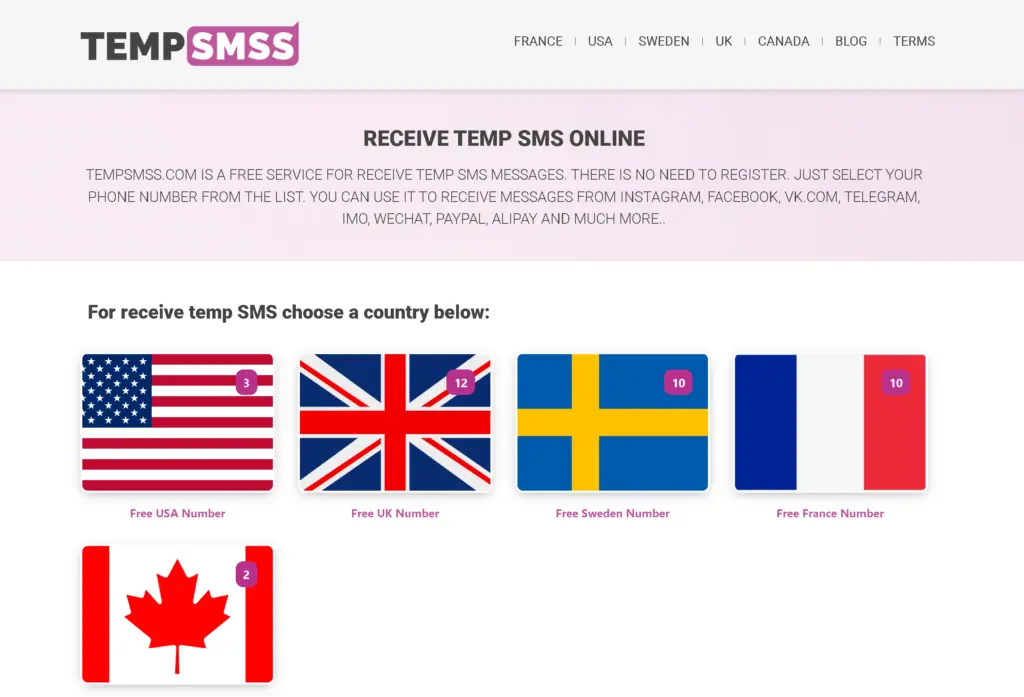
On the main page of the TempSMSS website, you can see the different flags of some most popular countries like the US, UK, Canada, Sweden and France. Choose one of them as per your request.

3- Find a Temp Number

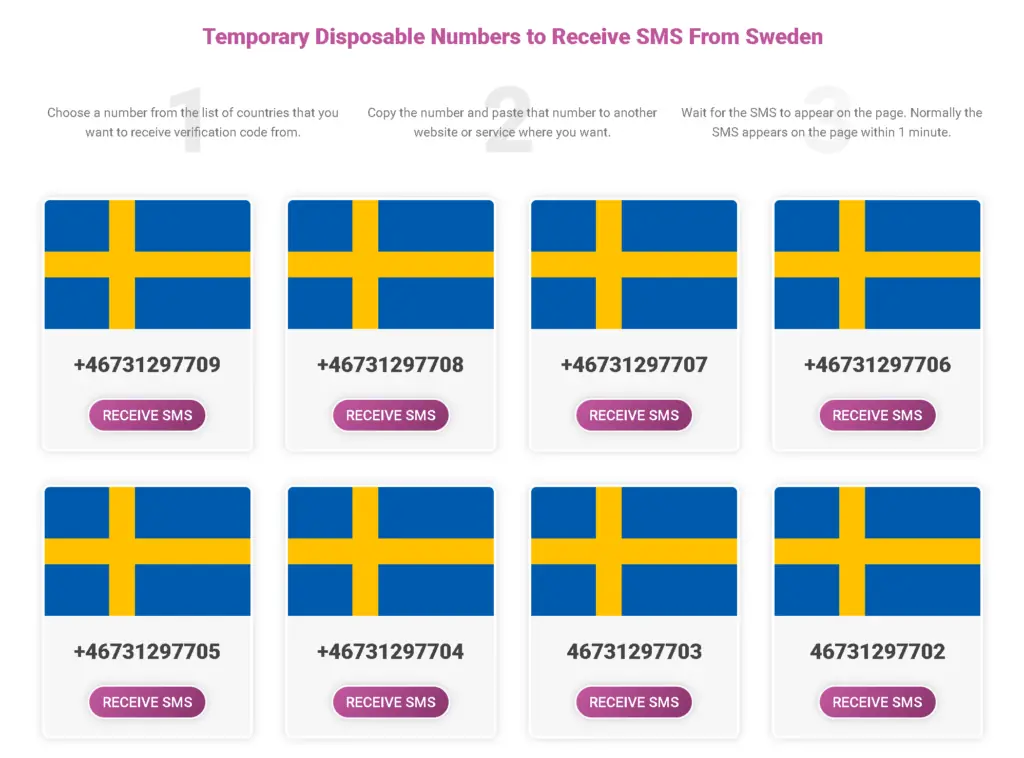
After choosing a Country, you have to find and select a proper number which you are seeing in the list of the numbers.

Receive Temp SMS - tempsmss.com choose a phone number to receive free sms disposable temp
Can I create LINE account without verify my personal number? 2

4- Enter the Number in LINE APP

Later on, copy the number in the TempSMSS.com website and paste it in the LINE verification page then press Submit and wait for the message to be received.

5- Here you go!

Your Create LINE account Verification code is received successfully, now you can type it in the LINE verification page to confirm and finalize the registering process.

Create a WhatsApp Account With a Temporary Phone Number

WhatsApp is one of the most used messaging apps in the world, and it asks for a phone number when you sign up.

Its trick is that for authorization, you don’t need a login or a password; all you need is a phone number. You can use online temporary numbers for WhatsApp because having a working SIM card is required to launch and use the messenger.

You can register in WhatsApp without using your personal phone number, but you can use a temporary phone number for free. This will be covered in our article.

WhatsApp enables businesses to communicate with their customers in real time and around the clock. As a communication channel, it increases both company loyalty and the likelihood of purchasing goods or ordering services.

And, if you use the right strategy, you will be able to shape the client’s perception of his close communication with the brand as if it were one of his friends.

The WhatsApp Business app is free for users who own small and medium-sized businesses. With its assistance, you can consult, receive feedback on the company’s work and the quality of goods/services, notify about the status of the order, and answer questions.

Thus we understand that WhatsApp is a true virtual assistant through which businesses can not only communicate with customers and provide information about goods or services, but also create catalogs and use special tools that allow for the configuration of automatic responses and the sorting of messages.

The product/service catalog card contains additional information such as the price, description, and so on. The most frequently asked question is how to create a WhatsApp account without a mobile phone. There is absolutely no way without a number.

You cannot use WhatsApp without first registering: in order to call and send text messages through this messenger, you must have a profile that is authorized and linked to a phone number.

Additional profiles are required to send text messages or make automatic phone calls. If you want a WhatsApp account that is not tied to your own number, a temporary number can receive the code. Anyone can read the messages on a public number, so do not use one for an account you need to keep.

How to Create a WhatsApp Account Using a Temporary Phone Number

A temporary phone number allows you to fully bypass SMS verification and authorize your WhatsApp account. Because the number is linked and checked only once in the messenger, there is no need to keep it active after that.

As a result, registering for a temporary phone number is a useful and convenient service. Use the extensive options provided by the service https://tempsmss.com to use a mobile number for registration.

Visitors can use free temporary phone numbers from more than five countries, including the United States, Canada, the United Kingdom, and France.

You can use numbers with various prefixes to receive SMS with a confirmation code from WhatsApp. Furthermore, the cost of online numbers is zero for WhatsApp registration.

How to Get a Free WhatsApp Virtual Number

In addition to free temporary phone numbers, https://tempsmss.com offers free phone numbers for SMS verification.

These are specific numbers to which you can send text messages for free without creating an account on the site.

Create WhatsApp With Temporary Phone Number
Create a WhatsApp Account With a Temporary Phone Number 3

Any SMS, except those from payment systems, is delivered to such an online sim card. Another advantage is the ability to receive repeated SMS messages to the same number by clicking the “Update” button on the website in the incoming messages window.

WhatsApp limits how many accounts one number can register. If a code does not arrive, try a number that received a WhatsApp SMS recently.

The tempsmss.com service is a must-have for online SMS activation. On the website, you can acquire a free virtual phone number that will allow you to complete the Facebook registration fast and easily right now for the price of 0 cents!! To get Free Temp SMS to UK, England, Canada mobile number for verification or any of countries available on the service, perform the following:

1- Open TempSMSS.com

TempSMSS can be opened in various monitor devices without any issues such as desktops, laptops and mobile devices.

Receive Temp SMS - open tempsmss.com to get free disposal temp phone number

2- Choose a Country

On the main page of the TempSMSS website, you can see the different flags of some most popular countries like the US, UK, Canada, Sweden and France. Choose one of them as per your request.

3- Find a Number

After choosing a Country, you have to find and select a proper number which you are seeing in the list of the numbers.

Receive Temp SMS - tempsmss.com choose a phone number to receive free sms disposable temp

4- Enter the Number in WhatsApp

Later on, copy the number in the TempSMSS.com website and paste it in the WhatsApp App verification page then press Submit and wait for the message to be received.

Your WhatsApp account Verification code is received successfully, now you can type it in the WhatsApp verification page to confirm and finalize the registering process.

Receive Temp SMS - create facebook with fake number 4

Create a Signal Account with Temporary Phone Number

Signal Private Messenger is a well-known encrypted message exchange platform. Even the owners of Signal cannot see the private exchanged text messages and the information of the messenger users due to the special data transfer protocol.

Different than Telegram, all messages are encrypted in the app, not just those sent in anonymous chats. Anyone interested can access the Signal source code on GitHub.

To begin using the Signal messenger, download the app and enter your phone number to which a confirmation code will be sent.

Signal has been in business since 29 July 2014. The App’s popularity skyrocketed after WhatsApp revised its privacy policies: because data is transferred to Facebook, anonymity is no longer an option.

Then people began to look for an alternative and came across the Signal messenger, which was praised by prominent figures such as Edward Snowden and Jack Dorsey.

It is impossible to use Signal messenger without account verification: the only question is which number will receive the code. Privacy enthusiasts will prefer the option in which the personal number is not used. And there is a way to do it.

Signal Messenger, like Viber, WhatsApp and other VOIP apps, verifies users by sending a six-digit verification code to their phone number.

To get your Free Signal Private Messenger Account, you’ll need a use phone number that can receive text messages, phone calls, or both.

In this article, we’ll show you how to create a Signal account without using your own phone number.

The Functionality of Signal and Oddities

The messenger is used to send text and voice messages, as well as voice and video calls. It is also possible to send photos, emoticons, videos, and stickers. Group chats (up to 1100 people) are available for corporate communication.

Signal employs E2EE encryption technology, which encrypts transmitted data without sending it to remote servers. Except for the chat participants, no one will have access to the messages (even Signal owners). As a result, any outside intervention is impossible.

Signal developers have added the option of automatically removing photos and videos a few seconds after viewing to increase privacy.

Get Virtual Temporary Phone Number from Signal

It is simple to use a virtual number to receive SMS from Signal. We’ve put together a step-by-step guide to help you figure it out.

Step #1: Get and install Signal Private Messenger.

Download the Signal Private Messenger App for Android from this link in Google Play Store and download the App from the App Store if you have an iPhone in this link. Also download Signal Messenger for windows OS directly from this link.

Install Signal by following the instructions and granting the App permission to access your Contacts and send you notifications.

Step#2. Verify Signal Using Temp Phone Number

After installing the app, open the Signal Private Messenger app in your mobile phone and follow the steps of the number verification stage. In the section of your phone number you will write the number which you get from tempsmss.com website and paste it there.

Step#3. Check the website to view received verification code

After entering the mobile phone to the Signal Private Messenger app to verify your account. You have to wait 1-2 seconds on the page which you copied the mobile number in.

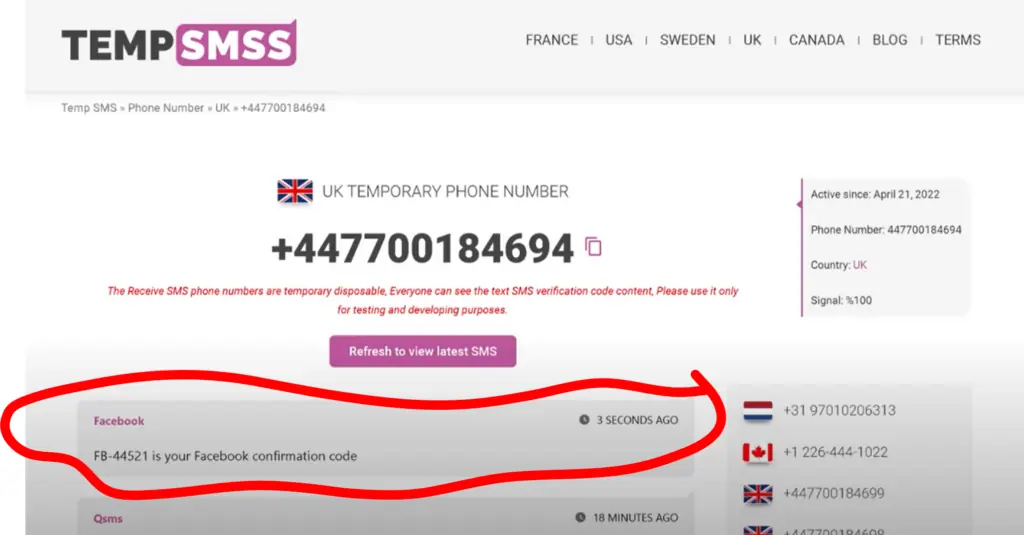
Refreshing the page is required to see last received SMS from apps like Signal, Instagram, Facebook and so on. By refreshing the page you will be able to see the 6-digit verification code of the Signal account. Copy the code and paste it in your Signal App phone.

Receive Temp SMS - create facebook with fake number 4
Create a Signal Account with Temporary Phone Number 4

The instructions provided are applicable to other websites and applications. There are numbers for almost all known countries and operators on the client’s selection.

This opens up the possibility of registering on foreign websites and applications that are not available in some countries.

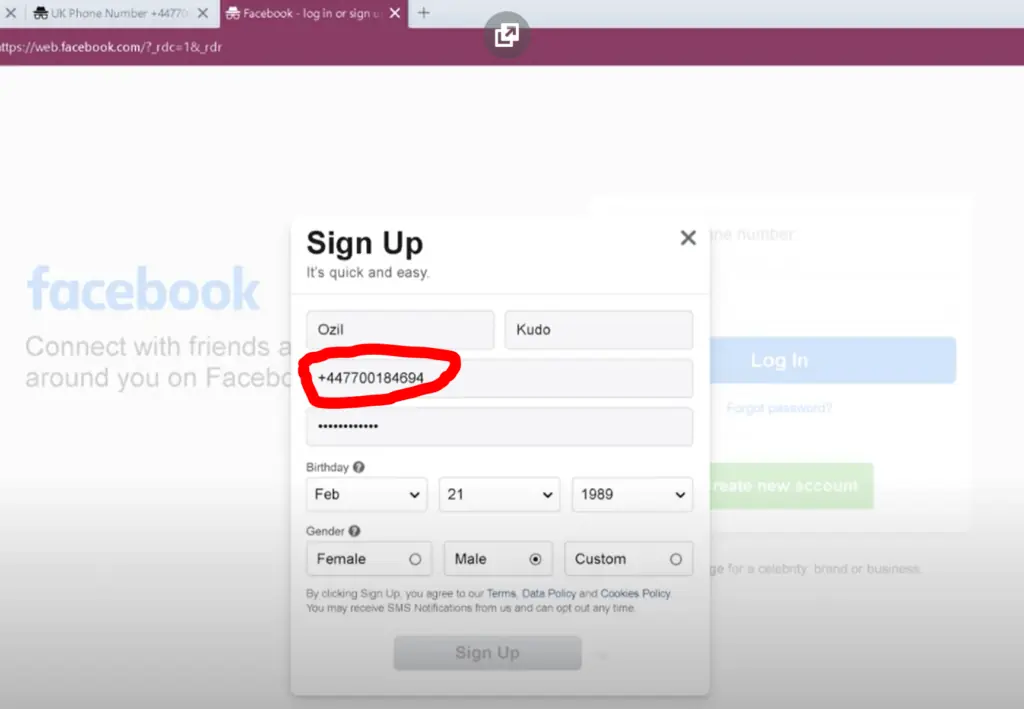
Create a Facebook account with Fake Mobile Number

To begin with, this is an essential working tool for target experts, SMM, and other digital marketing professionals that are heavily involved in advertising on this platform. This post will explain how to obtain an infinite amount of phone numbers to receive SMS online in a simple and legal manner.

Bypass Facebook verification with fake number

Creating Facebook accounts in the worldwide social network, continues to break world popularity records. According to 2022 statistics:

  • 2,3 billion (MAU) monthly active users;
  • 2,14 billion (DAU) daily visits;
  • 500 new registrations per minute;
  • 100+ million business pages;
  • and 90,2% of Internet marketers utilize Facebook.

As a result, it is not unexpected that more than 2 million businesspeople from all over the world have praised Facebook’s commercial appeal. And you should agree that this is a vast area of possibilities.

If you need to create multiple new accounts quickly, a virtual phone number is ideal. Webmasters, target specialists, and other advertising and marketing professionals frequently require this.

Ordinary users, however, are frequently faced with the need to obtain an internet number in order to evade Facebook phone verification.

There might be a variety of motives, ranging from the goal to obtain a new public unconnected to the original one, to the ban’s banal circumvention, to the desire to earn.

For example, for account registration and selling, or for the development and management of news sites. By the way, these ways of monetization are growing more appealing, according to the earn.

Professionals propose the SMS verification service TempSMSS to obtain a virtual number for SMS from Facebook.

How to get a free fake number for Facebook verification

The tempsmss.com service is a must-have for online SMS activation. On the website, you can acquire a free virtual phone number that will allow you to complete the Facebook registration fast and easily right now for the price of 0 cents!!

To get SMS to a fake UK, India, Pakistan, Russia, Vietnam, England, Vietnam, Indonesia, Cambodia, Thailand, Philippines mobile number for Facebook verification or any of the different countries available on the service, perform the following:

1- Open TempSMSS.com

TempSMSS can be opened in various monitor devices without any issues such as desktops, laptops and mobile devices.

Receive Temp SMS - open tempsmss.com to get free disposal temp phone number
Create a Facebook account with Fake Mobile Number 5

2- Choose a Country

On the main page of the TempSMSS website, you can see the different flags of some most popular countries like the US, UK, Canada, Sweden and France. Choose one of them as per your request.

3- Find a Number

After choosing a Country, you have to find and select a proper number which you are seeing in the list of the numbers.

Receive Temp SMS - tempsmss.com choose a phone number to receive free sms disposable temp
Create a Facebook account with Fake Mobile Number 6

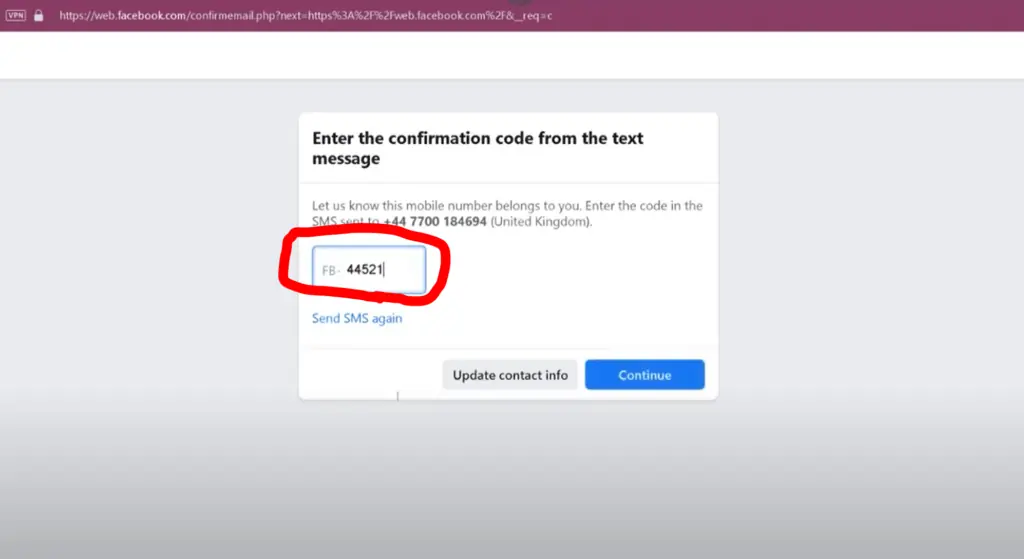
4- Enter the Number in Facebook

Later on, copy the number in the TempSMSS.com website and paste it in the Facebook verification page then press Submit and wait for the message to be received.

Create Facebook account

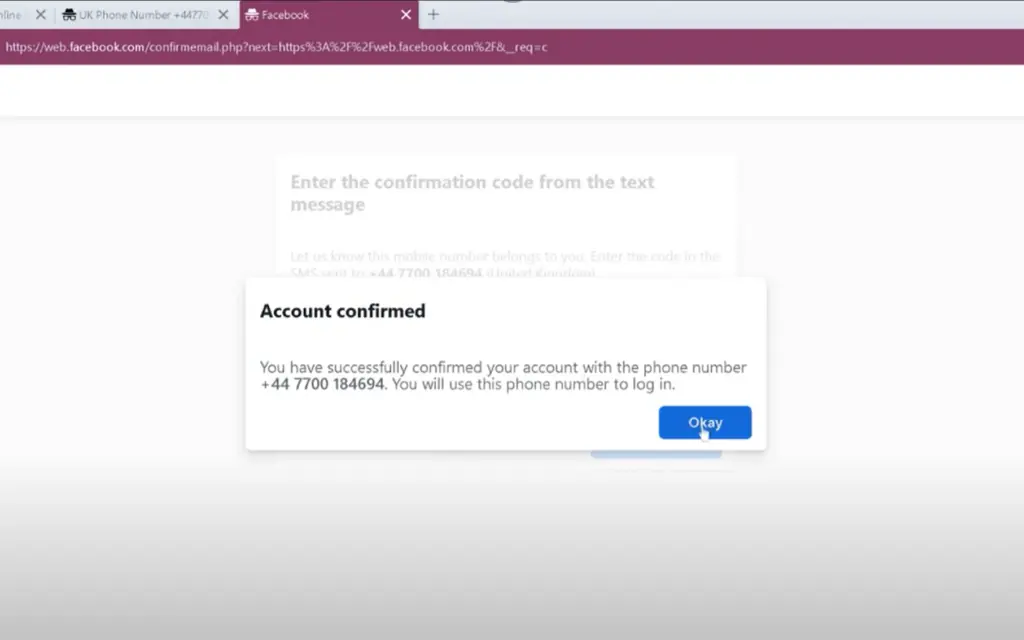
5- Bingo!

Your Create Facebook account Verification code is received successfully, now you can type it in the Facebook verification page to confirm and finalize the registering process.

Receive Temp SMS - create facebook with fake number 4
Create a Facebook account with Fake Mobile Number 7
Receive Temp SMS - create facebook with fake number 3
Create a Facebook account with Fake Mobile Number 8

Receive Temp SMS - create facebook with fake number 2
Create a Facebook account with Fake Mobile Number 9

Video tutorial about how to register a Facebook account with Fake Phone Number:

Get new numbers 10 minutes earlier in our Android app

Get it on Google Play

Google Play and the Google Play logo are trademarks of Google LLC.