Spannende manier om Telegram te maken zonder telefoonnummer

Same as the other social communication and messaging applications such as WhatsApp, Facebook, Google Voice, Tango, and Instagram, Telegram also requires a phone number while creating a new account and registering on their service.

Yet this method saves and prevents the system from creating spam and fraud accounts, it also inconveniences users who might not want to reveal their private phone number due to personal security reasons.

Additionally, some users may wish to use the second account on their Android or iPhone devices, or they may not have a valid SIM card or phone number on their smartphone devices.

As a result, we’ve provided the best method to get your Telegram account without a SIM card or Phone number below.

It’s good to mention that Telegram allows the users to hide their Phone Number and use their nick or user name while using it’s services.

The most convenient and smart way is using temporary and disposable phone numbers.

Tempsmss.com provides its users with an unlimited temp SMS received from all around the world without having any limitations which can be used to verify your new Telegram account.

1- Openen TempSMS website.

TempSMS kan probleemloos op verschillende monitorapparaten worden geopend, zoals desktops, laptops en mobiele apparaten.

Receive Temp SMS - open tempsmss.com to get free disposal temp phone number
Thrilling way to create Telegram without phone number 5

2- Kies een land

Op de hoofdpagina van de TempSMSS-website kunt u de verschillende vlaggen zien van enkele van de meest populaire landen, zoals de ONS, Groot-Brittannië, Canada, Zweden En Frankrijk. Kies een van hen volgens uw verzoek.

3- Zoek een nummer

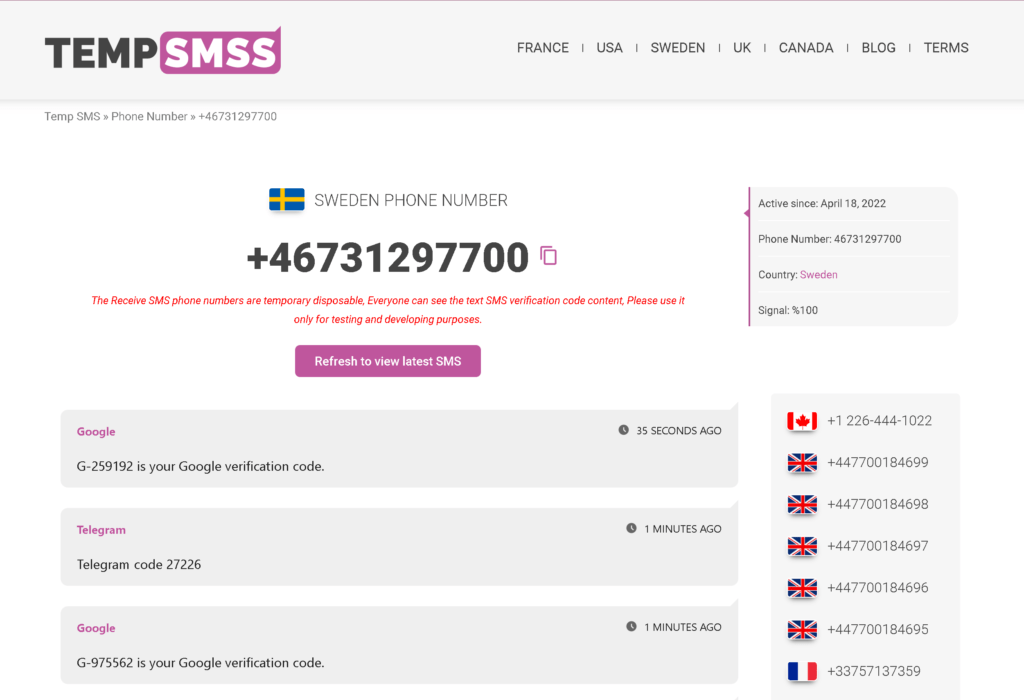
Nadat u een land heeft gekozen, moet u het juiste nummer zoeken en selecteren dat u in de lijst met nummers ziet.

Receive Temp SMS - tempsmss.com choose a phone number to receive free sms disposable temp
Thrilling way to create Telegram without phone number 6

4- Enter the Number in Telegram

Later on, Copy the number in the TempSMSS website and enter it in the Telegram account registering page then press Submit and wait for the message to be received.

5- Bingo!

Your Telegram Verification code is received successfully, now you can type it in the Telegram app to confirm and finalize the registering process.

Receive Temp SMS - tempsmss.com choose a phone number to receive free sms disposable temp usa
Thrilling way to create Telegram without phone number 7

Maak een Gmail-account met virtueel telefoonnummer

In dit bericht wordt uitgelegd hoe u met de TempSMS-verificatieservice Gmail-accounts kunt registreren zonder uw persoonlijke telefoonnummer te gebruikenmaak een onbeperkt aantal accounts aan.

Wanneer u zich bij Gmail registreert, moet u een telefoonnummer opgeven waarnaar een sms met een verificatiecode wordt verzonden.

Volgens de richtlijnen van het bedrijf is de gebruiker verplicht om aan elk account een telefoonnummer te koppelen. Een Google-profiel geeft toegang tot een aantal diensten, waaronder Gmail, Google Play en Google Maps.

De mogelijkheid om een ​​persoonlijk telefoonnummer te gebruiken is niet voor iedere gebruiker geschikt. Sommige mensen hebben veel persona's nodig, terwijl anderen hun privacy simpelweg niet in gevaar willen brengen.

Eén aanpak lost beide problemen op: Google verhuurt virtuele nummers.

Mobiel nummer voor verificatie van Gmail-account

Detempsmss.comMet deze service kunt u accounts aanmaken op de meest populaire websites zoals Gmail, Facebook, Instagram, Telegram en andere mobiele applicaties zonder uw persoonlijke mobiele nummer op te geven.

Create Gmail with temp Number verification

Het werkt doordat de gebruiker gratis tijdelijke nummers ontdekt, deze invoert tijdens de paginaregistratie en een sms ontvangt met een verificatiecode.

Deze nummers zijn goedkoper dan echte simkaarten. Bijvoorbeeld, CanadaZweden, de Verenigde Staten, Frankrijk en alle andere landen hebben geen toegangsprijzen.

U kunt onze nummers zo vaak gebruiken als u wilt. U wilt bijvoorbeeld twee Gmail-accounts maken: één voor persoonlijk gebruik en één voor zakelijk gebruik.

Dan heb je twee Google-accounts en twee wegwerptelefoonnummers nodig. Het hele proces, inclusief nummerverwerving, duurt enkele minuten. Herhaal de stappen in de instructie in de volgende subsectie.

Maak in 5 stappen meer dan één Gmail-account aan

Volg de stapsgewijze instructies om een ​​gratis virtueel nummer te verkrijgen en de accountregistratie bij Gmail te voltooien.

1- Openenwww.tempsmss.comen kies het land waarvan u een nummer wilt krijgen.

2- Haal een verwijderingstelefoonnummer uit de lijst.

Receive Temp SMS - open tempsmss.com to get free disposal temp phone number

3- Kopieer het tijdelijke telefoonnummer door op te klikkenkopiërenicon.

4- Plak en gebruik het terwijl u uw Gmail-account opnieuw registreert.

5- Ga vervolgens terug naar de website tempsmss.com en vernieuw de pagina. U zult zien dat uw ontvangen sms-verificatiecode daar is.

Receive Temp SMS - temp sms receive temporary sms mobile phone number tempsmss.com

Maak binnen 2 minuten een GeeGee-account aan via een tijdelijk nummer

Have you ever thought of creating another GeeGee.net account to use and benefit from the website? In this article we showed how to register a new account on geegee.net In the following video tutorial. By using Temp Number you can get your new GeeGee account instantly.

What is GeeGee.net?

GeeGee‘s main focus is on gaming monetization and money gamification.

The platform will be a subscription-based web service that connects and monetizes all users and content across all social media and content-hosting platforms.

We want to provide a viable alternative to the present industry models.

Why create a second account with temp numbers?

You might be wondering why we don’t mind if you create a fake GeeGee account, especially if you’re selling something on GeeGee or have a business account.

Here are a few reasons why creating a false account is preferable.

Privacy (Makes You Anonymous)

Protecting your privacy is one of the most serious concerns facing the general public in today’s digital environment. When you provide private info, such as your real phone number, you risk identity theft, cyberstalking, and other unwelcome attention.

You may protect yourself from all of this and more by using disposable phone temp numbers for SMS when signing up for internet services.

Suitable (It is Convenient)

The secret to using tempsms and temp numbers is that they are simply that: temporary and disposable. You use one if you need it – say, to create an account on the internet – and then put it away when you don’t.

Because of their short duration, these numbers will expire soon after the service you requested is finished. Do you require a different phone number for future sign-ups? Simply acquire a new phone number!

No Spam (Removes Spam)

For better or worse, once you give a corporation your mobile number, you are on their mailing list. Some companies’ terms of service allow them to utilize your personal information for marketing reasons.

In the real world, this translates to a never-ending barrage of spam texts delivered directly to your phone. Your phone number may be shared with third parties in some instances (again, as you permitted when agreeing to their terms of service).

You’ll never have to worry about follow-up marketing with a throwaway temp number for SMS.

Globally Accepted (Recognized Worldwide)

Many providers don’t bother to check if the phone number you offer is for a real phone or a virtual mailbox. If you obtain their verification code, you will be able to proceed to their main site without any additional obstacles.

You can use our tempsms online to receive temporary SMS to sign up for some of the world’s most popular internet services.Facebook,Telegram,Instagram, WhatsApp, Webmoney, Twitter, Gmail, Baidu, Amazon, Tinder, Chatroulette, eBay, LinkedIn, and other social media platforms are among them.

Temp SMS
Maak een GeeGee-account aan via een tijdelijk nummer in 2 minuten 14

Is tempsmss.com good to use?

Gebruikentemperaturenwebsite is a financially savvy and secure method for safeguarding yourself on the web.

It is set up for a brief time (typically just a month or two) to allow you to satisfy any service provider verification requirements.

After then, the temp number is no longer active, which means no further SMS correspondence from the provider or a third-party.

Ondersteuning van tijdelijke sms-nummers

We gebruiken advertenties om onze inhoud gratis voor u te houden.
Sta advertenties toe en laat sponsors uw surfgedrag financieren.
Bedankt! ❤️

Cool met mij ☺️ Ik heb mijn AdBlocker uitgeschakeld. Laten we gaan!
X