US vs UK Temporary Phone Numbers: Which Should You Use? (2026)

Choosing between a US temporary phone number and a UK temporary phone number depends entirely on which platform you are verifying. US numbers work best for US-based services (Instagram, Facebook, TikTok, PayPal), while UK numbers are preferred for UK-targeted apps and services. This guide compares both options across success rate, country detection, supported platforms, and use cases.

Quick Comparison Table

FeatureUS Numbers (TempSMSS)UK Numbers (TempSMSS)
Country code+1+44
Numbers available10+ active100+ active
Best forUS apps (Instagram, Snapchat, PayPal)UK apps + EU services
WhatsApp success rateModerateHigh
Telegram success rateHighHigh
Banking appsNot recommendedNot recommended
Number rotationSlower (smaller pool)Faster (larger pool)
PriceFreeFree

When to Use a US Temporary Number

Choose a US (+1) temporary number when:

  • The platform is US-based (Instagram, Snapchat, Twitter/X, PayPal, eBay, Craigslist)
  • You want to access US-only content or features
  • You are verifying an account in the United States region
  • The service requires a US area code for fraud detection

When to Use a UK Temporary Number

Choose a UK (+44) temporary number when:

  • The service is UK or EU-targeted
  • You want a higher number rotation rate (UK pool is larger)
  • WhatsApp verification — UK numbers tend to have higher success rates
  • You need a number for European service signups

Platform-by-Platform Recommendations

PlatformRecommended CountryWhy
WhatsAppUKHigher number availability, better success rates
TelegramEitherBoth work reliably
InstagramUSUS-based, may flag non-US numbers
FacebookUSBest success with matching country
TikTokUS or UKBoth supported
Twitter/XUSUS-headquartered service
SnapchatUSUS-based platform
SignalEitherCountry-agnostic

How to Get Either Number for Free

Both US and UK temporary numbers are completely free on TempSMSS. Visit the US Numbers or UK Numbers page, choose any active number, and use it to receive verification SMS instantly. No registration, no payment, no personal information required.

Frequently Asked Questions

Does it matter which country my temporary number is from?

Yes. Many platforms cross-reference the phone number country code against your IP address or stated location. Using a US number while signed in from the UK (or vice versa) can sometimes trigger fraud detection. For best results, match the country of the number to the platform you are verifying.

Can I use a US number for WhatsApp from outside the US?

Yes, you can use a US temporary number for WhatsApp from anywhere in the world. WhatsApp does not restrict number use by location, only by verification of ownership.

Which has more numbers available, US or UK?

UK temporary numbers on TempSMSS typically have a larger active pool (100+ numbers) compared to US (10+ numbers). This means UK numbers rotate faster and you have more options if one is blocked or rate-limited.

Using Temporary Phone Numbers from TempSMSS.com for Secure OTP Account Creation

Welcome to the world of secrecy and privacy in communication 🕵️‍♀️. Today, let’s dive into the fascinating realm of Temporary Phone Numbers. But why, you ask? Well, ever heard of the website tempsmss.com? If not, today is your lucky day! This website is a life-saver when it comes to generating a temporary number for receiving OTP. Imagine, being able to create accounts without ever having to disclose your real phone number! Sounds too good to be true, right? So, buckle up and let’s unveil the wonders of utilizing temporary numbers and maintaining our digital footprint under control. With this online privacy guide, you’re about to uncover the secrets of safe, private, and hassle-free digital communication. The journey begins, folks! 🚀

Understanding Temporary Phone Numbers

In the age of constant communication and digital presence, nothing can match the importance of privacy. Enter the world of “Temporary Phone Numbers.” This phrase might ring a few bells, especially if you’re constantly skeptical about sharing your personal phone number online.

Purpose and Benefits of Using Temporary Phone Numbers

The use of temporary numbers is not just a trend, it’s a practical option that caters to an increasing need for privacy and control. Let’s delve deeper into its purpose and the perks it introduces to our online interactions.

Privacy Protection

In an era where data leaks and personal information theft are always lurking around the corner, the ability to keep your real phone number hidden is a blessing. This is the main purpose of Temporary Phone Numbers. Whenever you’re required to verify your identity or register on a website, you can use a temporary number instead. It’s like throwing a cloak of invisibility around yourself on the internet.

Imagine not having to worry about marketing calls or unanticipated conversations. Wonderful, isn’t it? The use of these fleeting phone numbers helps you to maintain that much-needed boundary between your personal and online life.

Convenience and Accessibility

Another major benefit of a temporary phone number is the convenience it offers. No need for extra devices or SIM cards! Services like tempsmss.com allow you to access these temporary phone numbers right from your computer or smartphone. Be it account creation, one-time transactions or passing through pesky phone number verification processes, temporary numbers are your go-to option.

How Temporary Phone Numbers Work

You might now be wondering, “This sounds great, but how does it all work?” Let me illuminate the nitty-gritty for you.

Service Providers Like tempsmss.com

Various online platforms offer the service of temporary phone numbers – tempsmss.com being a prominent one. These providers possess a series of mobile numbers that they give out as “temporary.” Just choose a number, use it for your online tasks, and then leave it behind. All the incoming messages for a particular period go to these temporary numbers, and you can read them on the service provider’s platform.

Lifespace and Limitations of Temporary Numbers

One thing to remember here is that temporary numbers have a lifespan after which they expire. This ensures that your number isn’t floating on the internet indefinitely. It’s also worth noting that they’re not intended for long-term usage or personal communications, but for one-time tasks like obtaining OTPs for creating online accounts.

In sum, temporary phone numbers are your digital smoke screens. They’re easy to access, a boon for privacy, and an excellent way to maintain a healthy boundary between your personal life and your online presence. So, the next time you’re asked for a phone number on a site, you know exactly what to do!

Using Temporary Numbers for OTP Verification

When you need to create an account without telling your real phone number, temporary numbers for getting OTP becomes a lifesaver. But, how does it work exactly? Let’s dip into the specifics and provide a step-by-step guide for generating OTP using these descriptors. Additionally, we’ll tempt you with some leading advantages of opting for a solution like tempsmss.com.

Generating OTP with Temporary Numbers

OTP, or One Time Password, is typically a six-digit number that acts as a second stage of verification. Now, instead of committing your real phone number, you can use a temporary number, sparing your vital digits from potentially being compromised or spammed.

Step-by-Step Process

The beauty of using temporary numbers for OTP generation lies in its simplicity. Start by visiting a reliable platform like tempsmss.com. Choose amongst the different given numbers. Provide the selected one at the OTP request page of the service you’re subscribing to. Get back to tempsmss.com., wait for few seconds, and voila! The OTP will make a gracious appearance on the screen. Copy it, paste it, and you’re done.

Common Issues and Solutions

Despite the simplicity, you may sometimes find the OTP not coming up at tempsmss.com. Does it mean to sound an alarm? Absolutely not. These things happen, and mostly, it’s because the number might have been used excessively. The easy fix is to select another temporary number and try again.

Advantages of Using tempsmss.com for OTP

As this guide introduced you to the temporary numbers for OTP generation, we’d love to call out some exciting features of tempsmss.com. It will serve as a constant reminder of why you made a smart decision to not share your real phone number.

Wide Range of Supported Services

One of the key advantages is the extensive range of supported services. Be it social media platforms, online gaming sites, or e-commerce portals, chances are tempsmss.com is ready to serve your OTP generation needs.

Fast and Reliable Access to OTPs

Speed is critical when it comes to OTPs. The faster you get them, the better. tempsmss.com excels in this aspect, offering quick and reliable access to OTPs. Remember, the age of waiting endlessly for an OTP is over. Welcome to the era of temporary numbers, the real game-changers.

This guide is meant to be your friendly guide on using temporary phone numbers and services like tempsmss.com for OTP generation. Use these steps to protect your privacy and enjoy a wide range of online services without hesitation or fear.

Maintaining Security with Temporary Phone Numbers

The demand for personal privacy and data security in the digital age has led to numerous innovations, one of which is the concept of temporary phone numbers. Through providers like tempsmss.com, individuals can access temporary numbers for getting OTP to create accounts without revealing their real phone numbers. But before we dish out our virtual celebration cake, let’s take a deep dive into the intricacies of these services.

Identifying Secure Temporary Phone Number Services

When considering using a temporary phone number service, one must first know how to identify a secure service. It’s not always as simple as typing “temp phone numbers” into a search engine and choosing the first result. Instead, there are several criteria you should consider.

Criteria for Choosing a Service

Firstly, consider the reputation of the provider. Make use of user reviews and ratings to assess the quality of their services. A well-rated and reviewed service like tempsmss.com is usually a good choice. Secondly, consider the security measures taken by the provider to protect your temporary number. This information is often found in their privacy policies or FAQs section. Lastly, assess how straightforward it is to receive and use an OTP from the service provider – they should make this process hassle-free for users.

Red Flags to Avoid

Just as there are criteria to consider, there are also several red flags to avoid. One major red flag is if a service asks for your real phone number. A legitimate temporary number provider will not ask for this as it defeats the purpose of their existence. Also, if the website has poor overall design and lacks necessary information, it could be a potential scam.

Risks Associated with Temporary Phone Numbers

With every innovation designed to secure personal data, there usually are inherent risks. And yes, even the good old temporary phone number has its flip side.

Data Privacy Concerns

One of the most significant risks with temporary phone numbers is the potential for data privacy breaches. Some providers have been known to store user data and even sell them to third parties. Therefore, it is crucial to review the data privacy policy of the provider and ensure they commit to deleting OTPs and associated data after a certain time frame.

Potential Misuses

Temporary phone numbers could also be misused by some users for nefarious purposes, such as spamming, harassment, or even illegal activities. Providers must have a robust monitoring system in place to prevent such activities.

In conclusion, temporary phone numbers do offer a uniquely innovative tool for enhancing digital privacy, particularly when creating accounts where your real phone number is demanded. However, it is always crucial to approach with caution and ensure the benefits outweigh the potential risks.

Conclusion on the Use of Temporary Phone Numbers

In the ever weaving world of digital privacy, temporary phone numbers have found a significant place. They provide indispensable advantages that increasingly become valuable in the face of increasing risks characterized by the use of real phone numbers online.

Summarizing the Benefits

Primarily, temporary phone numbers from tempsmss.com are a secret weapon for OTP generation. They serve as a shield against hacking, spamming and other online cyberthreats linked with real phone numbers. Notably, you can use them to create accounts without ever having to reveal your original phone number.

It’s a modern-day fortress that safeguards you from cyberattacks that could lead to dire consequences such as identity theft. Their ease of use and functionality is as simple as ABC, thus excluding the necessity for overly technical knowledge. The cost of acquiring such numbers is normally lower compared to the potential losses linked with the use of real phone numbers online.

Finally, the convenience offered by these numbers is undeniably remarkable. You can receive your OTPs anywhere across the globe at any time. No more worries about roaming charges or being out of the service area.

Final Thoughts on Privacy and Security

In this digitally interconnected age, privacy and security have become buzzwords that are too important to ignore. With the rise of cybercrime, there is an increasingly urgent need to adopt safety measures, and the use of temporary phone numbers for OTP generation and account creation is a significant step in the right direction.

While tempsmss.com is arguably the market leader in providing temporary numbers, other platforms can also help you acquire a disposable phone number. But one thing is consistent – they all work towards ensuring that your real phone number is safe from prying eyes, and your personal data stays just that – personal.

So, the next time you think about creating an account, consider going the temporary number route. It’s a small step for an individual user but a giant leap for digital privacy and security. After all, in the world of the internet, anonymity can sometimes be the best armor.

Remember, your real phone number is your identity. Keep it safe!

Virtual Numbers to Receive Online OTP Codes: A Comprehensive Guide

Introduction

Online security is crucial today. OTPs are a key part of this security. Phone number temp services offer a new way to receive OTPs. They enhance security and privacy. This article explores virtual numbers in depth. We’ll look at how they work and why they’re gaining popularity.

Quick Answer: Virtual numbers are temporary phone numbers. They can receive SMS messages, including OTPs. No physical SIM card or device is needed. They offer better privacy and security. Many users find them convenient for online account verification.

What are virtual numbers?

Virtual numbers are online phone numbers. They don’t need a physical phone line or SIM card. These numbers exist in the cloud. Service providers manage them via the internet. Think of them as digital aliases for your real number.

Temp numbers can receive SMS messages. This includes OTP codes. You don’t need a separate device to use them. You can access messages through an app or website.

How do virtual numbers work for receiving OTP codes?

Using a temp phone number for verification is simple:

  1. Sign up for a virtual number service.
  2. Get assigned a number.
  3. Use this number for website or app verification.
  4. The service sends the OTP to your virtual number.
  5. Access the code via the service’s app or website.
  6. Enter the code to complete verification.

Virtual number providers use VoIP technology. This routes SMS messages to their servers. You can then access these messages through their platform. Your personal number stays private.

Why are virtual numbers becoming popular for online verification?

Several factors drive the popularity of free temporary number services:

  • Privacy concerns: Data breaches are common. People want to protect personal info.
  • Spam prevention: Virtual numbers reduce unwanted calls and messages.
  • Convenience: Manage multiple accounts with one device.
  • Global access: Use numbers from different countries easily.
  • Enhanced security: Add a layer between online activities and personal identity.

What are the benefits of using virtual numbers for OTP?

Virtual numbers offer several advantages for OTP verification:

BenefitDescription
Better PrivacyProtect your real number from data breaches.
Less SpamReduce unwanted calls and messages.
More FlexibleManage multiple accounts easily.
Global AccessUse numbers from various countries.
Temporary UseGreat for short-term needs or testing.

Are there any risks or drawbacks to using virtual numbers?

Virtual numbers have some potential drawbacks:

  • Service reliability: You depend on the provider’s uptime.
  • Account recovery: Some services may not allow recovery with virtual numbers.
  • Legal issues: Some places restrict virtual number use.
  • Cost: Premium features often have a price.
  • Trust concerns: Some platforms may flag virtual numbers as suspicious.

How do you obtain a virtual number?

Getting a free temporary phone number is usually easy:

  1. Choose a reputable provider.
  2. Sign up for an account.
  3. Pick a number from their options.
  4. Select a suitable plan.
  5. Download their app or save their website.

After setup, you can start using your virtual number right away.

Which services offer virtual numbers for OTP?

Several providers offer virtual number services:

  • Google Voice: Free US numbers. Limited SMS support.
  • Twilio: Programmable voice and SMS platform.
  • Hushed: Temporary numbers for various countries.
  • Burner: Disposable numbers for US and Canada.
  • TextNow: Free US and Canada numbers with ads.
  • TempSMSS: Provides temporary SMS services.

Research each option to find the best fit for you.

Can virtual numbers be used for other purposes besides OTP?

Yes! Virtual numbers are versatile tools:

  • Business: Use a professional number without a dedicated line.
  • Travel: Keep a local presence in different countries.
  • Online dating: Protect privacy when meeting new people.
  • Ads: Avoid sharing your personal number publicly.
  • App testing: Use multiple numbers to test SMS features.
  • Projects: Set up temporary contact numbers.

Are virtual numbers legal and compliant with online service policies?

The legality of virtual numbers can be complex:

  • Legal status: Most countries allow virtual numbers. Some have restrictions.
  • Service policies: Some platforms forbid virtual numbers. Check terms of service.
  • KYC regulations: Some services require non-virtual numbers for compliance.
  • Emergency services: Virtual numbers usually can’t call emergency services.

Use virtual numbers responsibly. Follow legal requirements and service policies.

How do virtual numbers compare to traditional phone numbers for OTP?

Let’s compare virtual and traditional numbers:

FeatureVirtual NumbersTraditional Numbers
PrivacyHigh (can be disposable)Lower (tied to identity)
ConvenienceAccess via app/webRequires physical device
CostVariesPart of phone plan
ReliabilityDepends on internetGenerally more reliable
AcceptanceNot always acceptedWidely accepted

What security measures should you consider when using virtual numbers?

Implement these security measures with virtual numbers:

  • Strong passwords: Use unique, complex passwords.
  • Two-factor auth: Add extra security to your account.
  • Monitor activity: Check for unauthorized use.
  • Choose reputable providers: Look for good security practices.
  • Limit personal info: Avoid linking to sensitive accounts.
  • Keep software updated: Always use the latest version.

How might virtual numbers evolve in the future?

The future of virtual numbers looks promising:

  • Better integration: Work seamlessly with more apps.
  • Smarter AI filtering: Improved spam detection.
  • Blockchain use: Enhanced security through decentralization.
  • Biometric auth: Added security for accessing services.
  • Wider global coverage: More country options available.
  • IoT integration: Help manage and authenticate IoT devices.

Conclusion

Virtual numbers are powerful for receiving OTPs. They offer privacy, convenience, and flexibility. They have some limitations. But their benefits make them attractive to many users. As technology advances, virtual numbers will likely improve. They may become even more widely used.

Virtual numbers can protect your privacy. They help manage multiple accounts. They open new communication options. Understanding their capabilities is key. Know their limitations and best practices. This knowledge helps you make informed decisions about using virtual numbers.

FAQ

  1. Q: Can I port my existing number to a virtual service?
    A: It depends on the provider. Some allow porting. Others only offer new numbers.
  2. Q: Are virtual numbers traceable?
    A: They offer more privacy than traditional numbers. But they’re not completely untraceable. Law enforcement can request information.
  3. Q: Can I use a virtual number for WhatsApp?
    A: Some services work with messaging apps. Compatibility varies. Check with your provider.
  4. Q: How long can I keep a virtual number?
    A: It varies by provider. Some offer temporary numbers. Others let you keep numbers as long as you subscribe.
  5. Q: Can I receive voice calls on a virtual number?
    A: Many services support both SMS and voice calls. This feature may cost extra.

Key Takeaways

  • Virtual numbers enhance privacy and security for OTPs.
  • They offer flexibility in managing multiple online accounts.
  • Costs vary from free to premium plans.
  • Consider legal and policy compliance when using virtual numbers.
  • Implement additional security measures for best results.
  • The future of virtual numbers looks promising with potential tech advancements.

For those looking for a reliable service, USA temp number options are available from providers like TempSMSS. These services offer a great way to get free SMS online for various verification needs.

Create a Claude AI Account Using a Temporary Number

Are you excited to explore the cutting-edge capabilities of Claude AI? Perhaps you’ve heard about its powerful language models and want to dive in. But wait, there’s a catch: the phone number verification requirement. Fear not! In this comprehensive guide, we’ll walk you through how to register for Claude AI using temporary phone numbers, ensuring your privacy and security.

Remember, Claude is here to assist you, whether you’re brainstorming alone or building with a team of thousands. Happy exploring! 🚀🤖

Why Use Temporary Phone Numbers?

Temporary phone numbers provide a layer of anonymity and security that permanent phone numbers do not. They can help you:

  • Protect your personal information: Keep your real phone number private and avoid spam.
  • Try before you share: See how a sign-up works before you give it your own number.
  • Simplify account verification: Verify without handing out your primary number.

Choosing a Reliable Temporary Number Service

Before creating your Claude AI account, you’ll need a reliable temporary number service. Some reputable options include:

  • TempSmss: Offers a wide range of temporary numbers from various countries.
  • Burner: Provides temporary numbers that can be used for multiple purposes.
  • Google Voice: A free service for temporary numbers, though it may require some setup.

For this guide, we’ll use TempSmss due to its ease of use and variety of options.

Step-by-Step Guide to Creating a Claude AI Account with TempSmss

Step 1: Visit TempSmss

Go to the TempSmss website at TempSmss. This service offers temporary numbers from different countries, making it easy to choose one that suits your needs.

Step 2: Select Your Country

Choose the country from which you want to obtain a temporary number. TempSmss offers options from the USA, Canada, UK, and more. For example:

Step 3: Choose a Temporary Number

Select a number from the available list. Make sure it is active and has not been used for spam or other problematic activities.

Step 4: Register on Claude AI

Go to the Claude AI registration page. Enter the temporary number you obtained from TempSmss when prompted for a phone number. Complete the registration form with the required details.

Step 5: Verify Your Number

TempSmss will display any incoming messages sent to your temporary number. Wait for the verification code from Claude AI and enter it in the appropriate field on the registration page.

Step 6: Complete Registration

Once your number is verified, complete any remaining steps to finalize your Claude AI account. Congratulations! You now have a Claude AI account using a temporary number.

Why Does Claude AI Require Phone Number Verification?

Before we delve into the solutions, let’s understand why Claude AI insists on phone verification:

  1. Security: Verifying your phone number helps prevent spam, abuse, and fake accounts.
  2. Compliance: It ensures that users are real humans, adhering to Anthropic’s terms of service.
  3. Account Recovery: A verified phone number assists in regaining access if you lose your login credentials.
  4. Two-Factor Authentication: Adds an extra layer of security to protect your Claude AI account.

However, this requirement has unintentionally excluded users from countries where Claude hasn’t officially launched yet. Let’s explore workarounds!

Option 1: Use a Virtual Phone Number Service

One popular method is to use virtual phone number services. These websites provide temporary phone numbers from the US or UK. Here’s how it works:

  1. Open a free UK or US number on TempSMSS.
  2. Select a US or UK phone number.
  3. Use this temporary number during the Claude AI registration process.
  4. Receive the verification code on the virtual number and enter it to complete your registration.

A public number is shared, so use it only for the sign-up and keep your account secured with your own email.

Now, go ahead and create your Claude AI account. The future of AI awaits!

Benefits of Using Temporary Numbers for Online Accounts

Using temporary numbers isn’t just about privacy; it’s about convenience and control. Here are some key benefits:

  • Enhanced Security: Protect your personal information from potential data breaches.
  • Flexibility: Keep your own number out of sign-ups you only need once.
  • Spam Prevention: Avoid unwanted calls and messages to your primary number.
  • Anonymity: Maintain a level of anonymity when signing up for new services.

Using Virtual Phone Numbers for Claude AI 2025

As Claude AI continues to evolve, the importance of secure account creation methods grows. Claude AI 2025 is expected to introduce new features that will make the platform even more powerful. Using virtual phone numbers can help you stay ahead of the curve and protect your information as these updates roll out.

Frequently Asked Questions

Are temporary phone numbers safe to use?

Yes, temporary phone numbers are safe and offer a good level of privacy and security. Just ensure you use a reputable service like TempSmss.

Can I use temporary numbers for all types of online accounts?

Most online services accept temporary numbers for account creation and verification. However, some services might restrict their use, so it’s always good to check their terms and conditions.

How long can I use a temporary number?

The duration a temporary number is active varies by service. TempSmss, for example, offers numbers that can be used for a few hours to several days.

What should I do if a temporary number is not working?

If a temporary number is not working, try selecting another number from the service. Sometimes, numbers may be inactive or already used too frequently.

Can I use a fake number to create a Claude AI account?

Using a fake number can be risky as it might violate the terms of service of Claude AI. It’s better to use a legitimate temporary number from a service like TempSmss to avoid any issues.

Conclusion

Creating a Claude AI account using a temporary phone number is a simple way to keep your own number private. By following these steps and using a reliable service like TempSmss, you can enjoy the benefits of Claude AI without compromising your personal information. Remember, the key to successful online interactions is staying informed and choosing the right tools to safeguard your digital presence.

Ready to create your Claude AI account? Head over to TempSmss to get started with a temporary number today!

Receive Online SMS from Temp Sweden Numbers

Sweden is a country with a high level of technology adoption, making it a convenient place to receive online SMS messages. There are a variety of options available for receiving online SMS from temporary Sweden numbers, which can be useful for a variety of purposes such as verifying accounts, receiving notifications, or conducting business.

Receiving Temporary SMS Options

One option for receiving online SMS from temporary Sweden numbers is to use a virtual phone number service. These services provide virtual phone numbers that can be used to receive SMS messages online. Many of these services offer temporary phone numbers that can be used for a limited time, such as a few days or weeks. This can be useful for situations where you need a temporary phone number for a specific purpose, such as verifying an online account or receiving notifications. One example of a service that offers temporary Sweden phone numbers is tempsmss.com.

Receive Temporary SMS via SIM card

Another option for receiving online SMS from temporary Sweden numbers is to use a SIM card from a Swedish mobile provider. Many mobile providers offer prepaid SIM cards that can be purchased and used for a limited time. These SIM cards can be used to receive SMS messages in Sweden, allowing you to use your phone or other device to receive messages while you are in the country.

Receive Temporary SMS via Tempsmss.com

There are a number of other options available for receiving online SMS from temporary Sweden numbers, including using a forwarding service or setting up a virtual private network (VPN). These options may be more complex to set up, but can offer additional features such as the ability to send SMS messages as well as receive them. For example, tempsmss.com offers a variety of forwarding options that can be used to receive online SMS messages in Sweden.

Drawbacks and Benefits

Overall, there are a number of options available for receiving online SMS from temporary Sweden numbers, each with its own benefits and drawbacks. By considering your specific needs and the features offered by different options, you can choose the solution that is best suited to your needs. Whether you are looking for a simple solution like a virtual phone number service or a more comprehensive option like a forwarding service, there is likely a solution available that can meet your needs.

One of the benefits of using a temporary Sweden phone number to receive online SMS messages is the ability to keep your personal phone number private. This can be especially useful for situations where you do not want to share your personal phone number with others, such as when using online dating or job search websites. By using a temporary phone number, you can protect your personal phone number and keep your communication separate from your personal life.

Another benefit of using a temporary Sweden phone number is the ability to use it for a specific purpose and then discard it when it is no longer needed. This can be useful if you only need a phone number for a short period of time, such as for a temporary job or project. After the project is completed, you can simply stop using the temporary phone number and move on to other things.

In addition to virtual phone number services and prepaid SIM cards, there are a number of other options available for receiving online SMS from temporary Sweden numbers. For example, some services offer the ability to receive SMS messages through a web-based interface or via email. This can be a convenient option if you do not have a physical phone or device to receive the messages on, or if you prefer to receive your messages in a different format.

receiving online SMS from temporary Sweden numbers
Receiving online SMS from temporary Sweden numbers

Another option for receiving online SMS from temporary Sweden numbers is to use a messaging app that supports temporary phone numbers. Many messaging apps, such as WhatsApp or Signal, offer the ability to use temporary phone numbers for messaging. This can be a convenient option if you already use a messaging app for communication and do not want to switch between multiple apps or phone numbers.

Summary

Finally, it is important to keep in mind that some online services may not allow the use of temporary phone numbers or may have restrictions on how they can be used. For example, some services may require you to use a phone number that is tied to a specific country or region. It is a good idea to check the terms of service for any online service you plan to use to ensure that you are able to use a temporary phone number if needed.

I hope these additional paragraphs provide additional information and context about receiving online SMS from temporary Sweden numbers. If you have any further questions or would like more information on this topic, please let me know.

Receive SMS from Finland Temporary Numbers

Receive SMS with Finland Temporary Numbers

SMS is a great way to keep in touch with your loved ones during long periods of separation. But what if you need to text from a Finland temporary number? This can be tricky, since many SMS services don’t work internationally. Luckily, there are several services that allow you to send and receive SMS from Finland temporary numbers without any trouble. In this blog post, we will outline the best of these services and how to use them.

What is Temporary Numbers for SMS?

Temporary numbers for SMS are numbers which can be used to send and receive SMS messages from Finland. These temporary numbers are typically valid for a short period of time, and they will be automatically cancelled once the timer has run out. If you need to send or receive a message using a temporary number from Finland, it is best to use one of the following services:

Temp SMSS – This service allows you to track the status of your SMS messages, and it also provides information about the sender and recipient of each message. You can also view your sent and received SMS messages history.

Also allows you to receive SMS messages as well as make phone calls using pre-paid minutes. You will need to sign up for a free trial account in order to use this service.

How does Temporary Numbers work?

If you are in Finland and want to receive SMS messages from abroad, you can use a Temporary Number. A Temporary Number is a phone number that is only valid for a certain amount of time. The duration of the number’s validity can be determined by the provider. After the number has expired, it will stop working and no longer be able to send or receive SMS messages.

To get a temporary number in Finland, you first need to sign up with an international provider like Skype or Viber. Once you have registered, you will need to enter your mobile phone number and the country where you would like to receive messages. You will then be given a Temporary Number that is valid for a set amount of time.

When your Temporary Number expires, it will stop working and no longer be able to send or receive SMS messages. You can keep track of when your Temporary Number expires by visiting the provider’s website or by checking your notifications panel on your phone.

How to receive SMS from Finland Temporary Numbers

If you need to send or receive SMS from Finland, but don’t have a Finnish phone number, here are some options:

1) Use a one of our website numbers that supporting receiving SMS. Check with your service provider to see if they offer a Finnish SMS service.

2) Try using an online service such as Skype or WhatsApp. Just add “Finland” as the country in your contacts list and you’ll be good to go!

3) Use a forwarding service to forward your Finnish phone number to another phone. This is usually done through an app like WhatsApp or Skype, so just search for “forwarding Finland” in your app store.

4) Rent a temporary Finnish phone number. This can be done through services like tempsmss.com or Finnline services. These services will provide you with a Finnish phone number and all the necessary instructions to use it.

Conclusion

Do you want to be able to receive SMS messages from Finland’s Temporary Numbers? If so, then you’ll need a SIM card from Finnish operator DNA. You can find out more about receiving SMS messages from Finland’s Temporary Numbers on their website or by calling them.

Create a WhatsApp Account With a Temporary Phone Number

WhatsApp is one of the most used messaging apps in the world, and it asks for a phone number when you sign up.

Its trick is that for authorization, you don’t need a login or a password; all you need is a phone number. You can use online temporary numbers for WhatsApp because having a working SIM card is required to launch and use the messenger.

You can register in WhatsApp without using your personal phone number, but you can use a temporary phone number for free. This will be covered in our article.

WhatsApp enables businesses to communicate with their customers in real time and around the clock. As a communication channel, it increases both company loyalty and the likelihood of purchasing goods or ordering services.

And, if you use the right strategy, you will be able to shape the client’s perception of his close communication with the brand as if it were one of his friends.

The WhatsApp Business app is free for users who own small and medium-sized businesses. With its assistance, you can consult, receive feedback on the company’s work and the quality of goods/services, notify about the status of the order, and answer questions.

Thus we understand that WhatsApp is a true virtual assistant through which businesses can not only communicate with customers and provide information about goods or services, but also create catalogs and use special tools that allow for the configuration of automatic responses and the sorting of messages.

The product/service catalog card contains additional information such as the price, description, and so on. The most frequently asked question is how to create a WhatsApp account without a mobile phone. There is absolutely no way without a number.

You cannot use WhatsApp without first registering: in order to call and send text messages through this messenger, you must have a profile that is authorized and linked to a phone number.

Additional profiles are required to send text messages or make automatic phone calls. If you want a WhatsApp account that is not tied to your own number, a temporary number can receive the code. Anyone can read the messages on a public number, so do not use one for an account you need to keep.

How to Create a WhatsApp Account Using a Temporary Phone Number

A temporary phone number allows you to fully bypass SMS verification and authorize your WhatsApp account. Because the number is linked and checked only once in the messenger, there is no need to keep it active after that.

As a result, registering for a temporary phone number is a useful and convenient service. Use the extensive options provided by the service https://tempsmss.com to use a mobile number for registration.

Visitors can use free temporary phone numbers from more than five countries, including the United States, Canada, the United Kingdom, and France.

You can use numbers with various prefixes to receive SMS with a confirmation code from WhatsApp. Furthermore, the cost of online numbers is zero for WhatsApp registration.

How to Get a Free WhatsApp Virtual Number

In addition to free temporary phone numbers, https://tempsmss.com offers free phone numbers for SMS verification.

These are specific numbers to which you can send text messages for free without having to register on the site.

Create WhatsApp With Temporary Phone Number
Create a WhatsApp Account With a Temporary Phone Number 13

Any SMS, except those from payment systems, is delivered to such an online sim card. Another advantage is the ability to receive repeated SMS messages to the same number by clicking the “Update” button on the website in the incoming messages window.

WhatsApp limits how many accounts one number can register. If a code does not arrive, try a number that received a WhatsApp SMS recently.

The tempsmss.com service is a must-have for online SMS activation. On the website, you can acquire a free virtual phone number that will allow you to complete the Facebook registration fast and easily right now for the price of 0 cents!! To get Free Temp SMS to UK, England, Canada mobile number for verification or any of countries available on the service, perform the following:

1- Open TempSMSS.com

TempSMSS can be opened in various monitor devices without any issues such as desktops, laptops and mobile devices.

Receive Temp SMS - open tempsmss.com to get free disposal temp phone number

2- Choose a Country

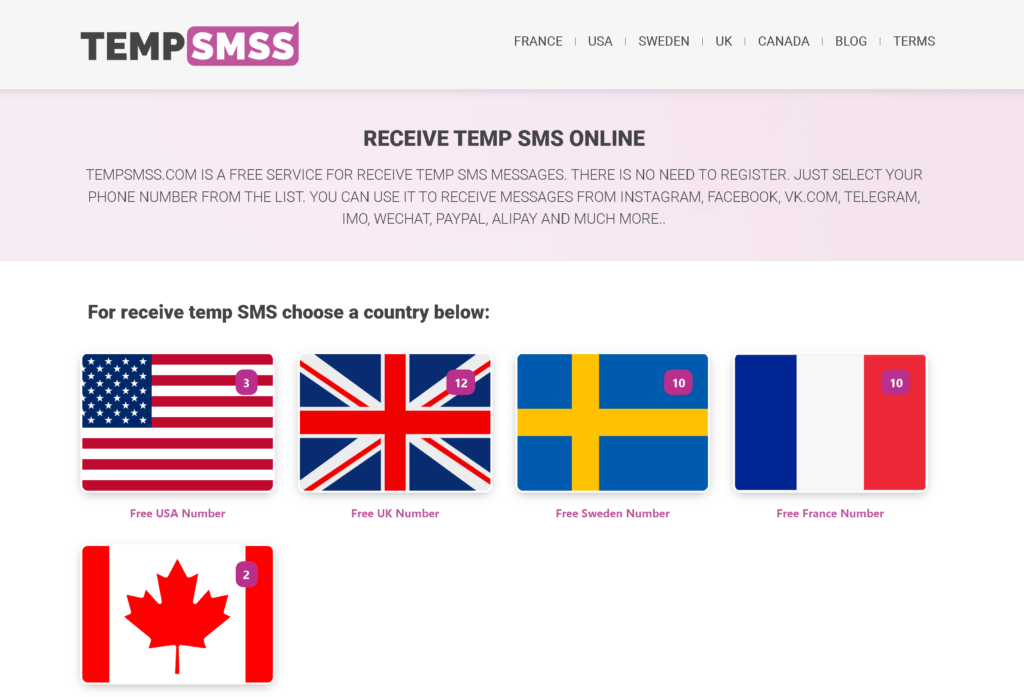
On the main page of the TempSMSS website, you can see the different flags of some most popular countries like the US, UK, Canada, Sweden and France. Choose one of them as per your request.

3- Find a Number

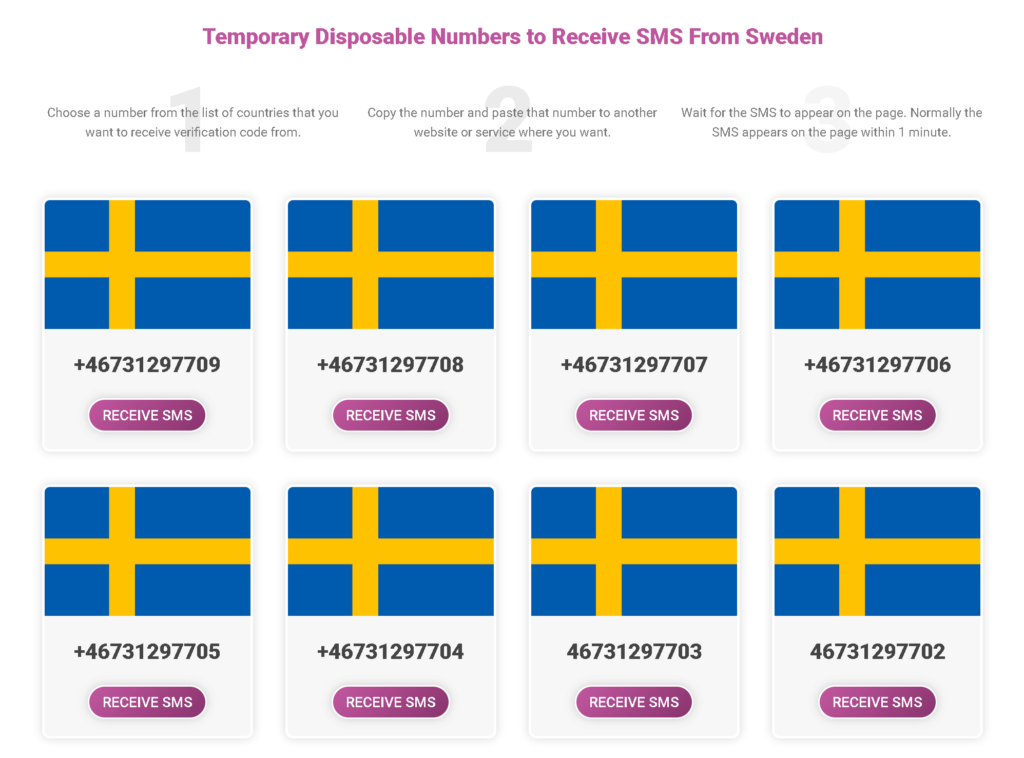
After choosing a Country, you have to find and select a proper number which you are seeing in the list of the numbers.

Receive Temp SMS - tempsmss.com choose a phone number to receive free sms disposable temp

4- Enter the Number in WhatsApp

Later on, copy the number in the TempSMSS.com website and paste it in the WhatsApp App verification page then press Submit and wait for the message to be received.

Your WhatsApp account Verification code is received successfully, now you can type it in the WhatsApp verification page to confirm and finalize the registering process.

Receive Temp SMS - create facebook with fake number 4

Create a Signal Account with Temporary Phone Number

Signal Private Messenger is a well-known encrypted message exchange platform. Even the owners of Signal cannot see the private exchanged text messages and the information of the messenger users due to the special data transfer protocol.

Different than Telegram, all messages are encrypted in the app, not just those sent in anonymous chats. Anyone interested can access the Signal source code on GitHub.

To begin using the Signal messenger, download the app and enter your phone number to which a confirmation code will be sent.

Signal has been in business since 29 July 2014. The App’s popularity skyrocketed after WhatsApp revised its privacy policies: because data is transferred to Facebook, anonymity is no longer an option.

Then people began to look for an alternative and came across the Signal messenger, which was praised by prominent figures such as Edward Snowden and Jack Dorsey.

It is impossible to use Signal messenger without account verification: the only question is which number will receive the code. Privacy enthusiasts will prefer the option in which the personal number is not used. And there is a way to do it.

Signal Messenger, like Viber, WhatsApp and other VOIP apps, verifies users by sending a six-digit verification code to their phone number.

To get your Free Signal Private Messenger Account, you’ll need a use phone number that can receive text messages, phone calls, or both.

In this article, we’ll show you how to create a Signal account without using your own phone number.

The Functionality of Signal and Oddities

The messenger is used to send text and voice messages, as well as voice and video calls. It is also possible to send photos, emoticons, videos, and stickers. Group chats (up to 1100 people) are available for corporate communication.

Signal employs E2EE encryption technology, which encrypts transmitted data without sending it to remote servers. Except for the chat participants, no one will have access to the messages (even Signal owners). As a result, any outside intervention is impossible.

Signal developers have added the option of automatically removing photos and videos a few seconds after viewing to increase privacy.

Get Virtual Temporary Phone Number from Signal

It is simple to use a virtual number to receive SMS from Signal. We’ve put together a step-by-step guide to help you figure it out.

Step #1: Get and install Signal Private Messenger.

Download the Signal Private Messenger App for Android from this link in Google Play Store and download the App from the App Store if you have an iPhone in this link. Also download Signal Messenger for windows OS directly from this link.

Install Signal by following the instructions and granting the App permission to access your Contacts and send you notifications.

Step#2. Verify Signal Using Temp Phone Number

After installing the app, open the Signal Private Messenger app in your mobile phone and follow the steps of the number verification stage. In the section of your phone number you will write the number which you get from tempsmss.com website and paste it there.

Step#3. Check the website to view received verification code

After entering the mobile phone to the Signal Private Messenger app to verify your account. You have to wait 1-2 seconds on the page which you copied the mobile number in.

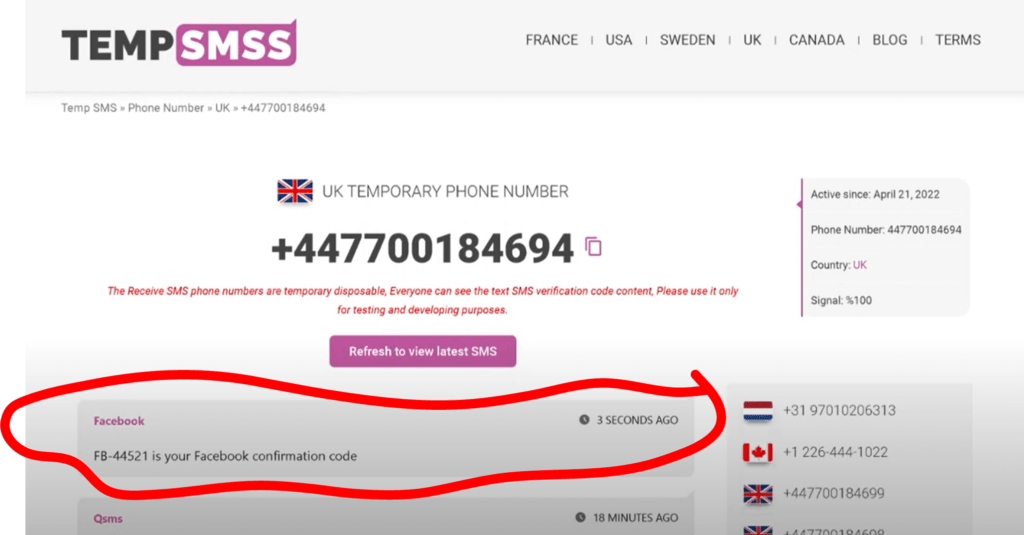
Refreshing the page is required to see last received SMS from apps like Signal, Instagram, Facebook and so on. By refreshing the page you will be able to see the 6-digit verification code of the Signal account. Copy the code and paste it in your Signal App phone.

Receive Temp SMS - create facebook with fake number 4
Create a Signal Account with Temporary Phone Number 16

The instructions provided are applicable to other websites and applications. There are numbers for almost all known countries and operators on the client’s selection.

This opens up the possibility of registering on foreign websites and applications that are not available in some countries.

Create a Facebook account with Fake Mobile Number

To begin with, this is an essential working tool for target experts, SMM, and other digital marketing professionals that are heavily involved in advertising on this platform. This post will explain how to obtain an infinite amount of phone numbers to receive SMS online in a simple and legal manner.

Bypass Facebook verification with fake number

Creating Facebook accounts in the worldwide social network, continues to break world popularity records. According to 2022 statistics:

  • 2,3 billion (MAU) monthly active users;
  • 2,14 billion (DAU) daily visits;
  • 500 new registrations per minute;
  • 100+ million business pages;
  • and 90,2% of Internet marketers utilize Facebook.

As a result, it is not unexpected that more than 2 million businesspeople from all over the world have praised Facebook’s commercial appeal. And you should agree that this is a vast area of possibilities.

If you need to create multiple new accounts quickly, a virtual phone number is ideal. Webmasters, target specialists, and other advertising and marketing professionals frequently require this.

Ordinary users, however, are frequently faced with the need to obtain an internet number in order to evade Facebook phone verification.

There might be a variety of motives, ranging from the goal to obtain a new public unconnected to the original one, to the ban’s banal circumvention, to the desire to earn.

For example, for account registration and selling, or for the development and management of news sites. By the way, these ways of monetization are growing more appealing, according to the earn.

Professionals propose the SMS verification service TempSMSS to obtain a virtual number for SMS from Facebook.

How to get a free fake number for Facebook verification

The tempsmss.com service is a must-have for online SMS activation. On the website, you can acquire a free virtual phone number that will allow you to complete the Facebook registration fast and easily right now for the price of 0 cents!!

To get SMS to a fake UK, India, Pakistan, Russia, Vietnam, England, Vietnam, Indonesia, Cambodia, Thailand, Philippines mobile number for Facebook verification or any of the different countries available on the service, perform the following:

1- Open TempSMSS.com

TempSMSS can be opened in various monitor devices without any issues such as desktops, laptops and mobile devices.

Receive Temp SMS - open tempsmss.com to get free disposal temp phone number
Create a Facebook account with Fake Mobile Number 25

2- Choose a Country

On the main page of the TempSMSS website, you can see the different flags of some most popular countries like the US, UK, Canada, Sweden and France. Choose one of them as per your request.

3- Find a Number

After choosing a Country, you have to find and select a proper number which you are seeing in the list of the numbers.

Receive Temp SMS - tempsmss.com choose a phone number to receive free sms disposable temp
Create a Facebook account with Fake Mobile Number 26

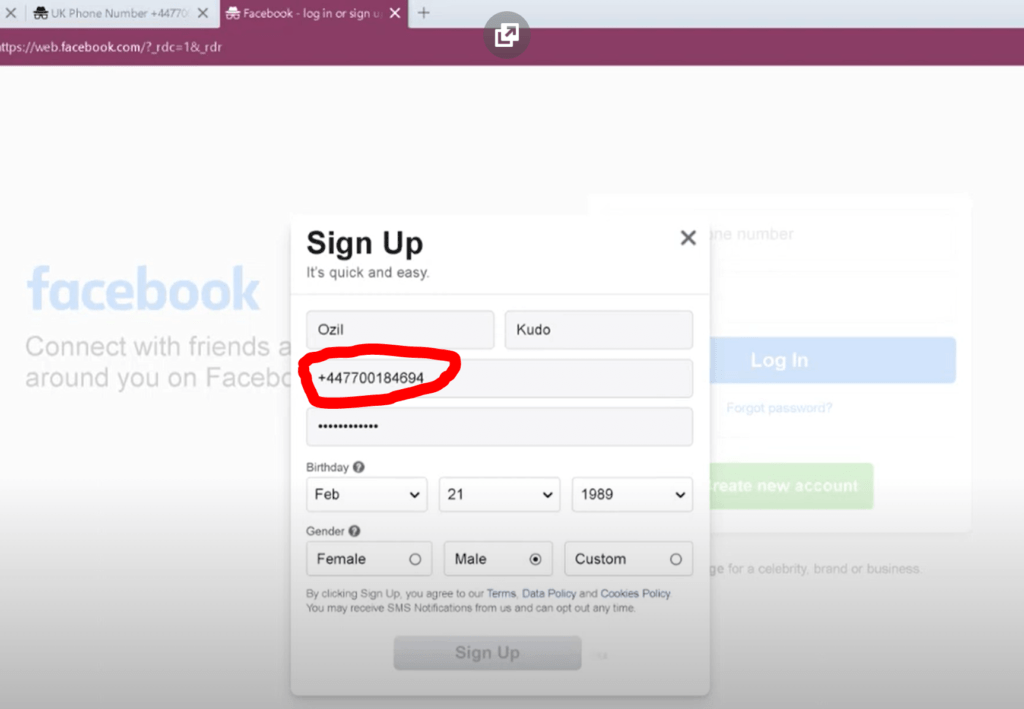
4- Enter the Number in Facebook

Later on, copy the number in the TempSMSS.com website and paste it in the Facebook verification page then press Submit and wait for the message to be received.

Create Facebook account

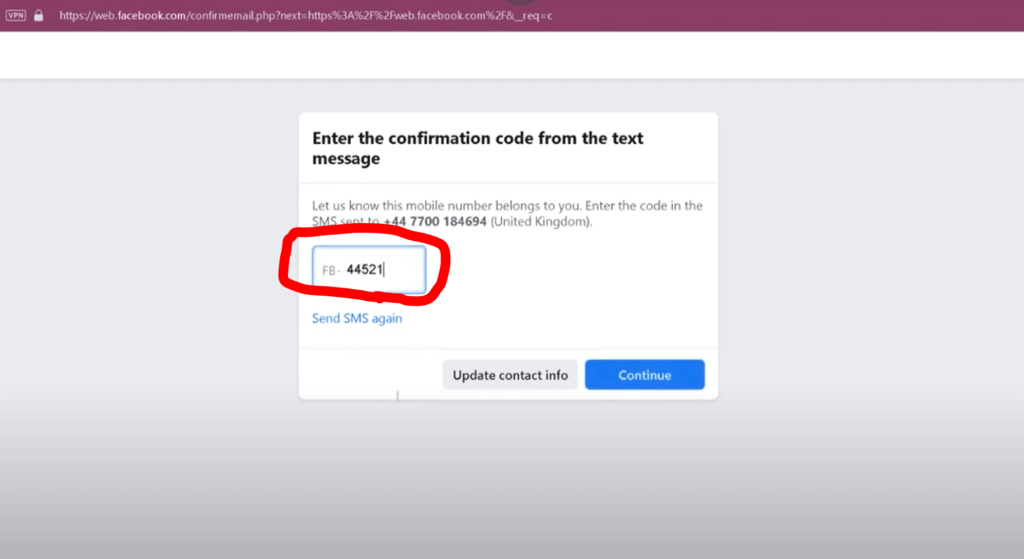
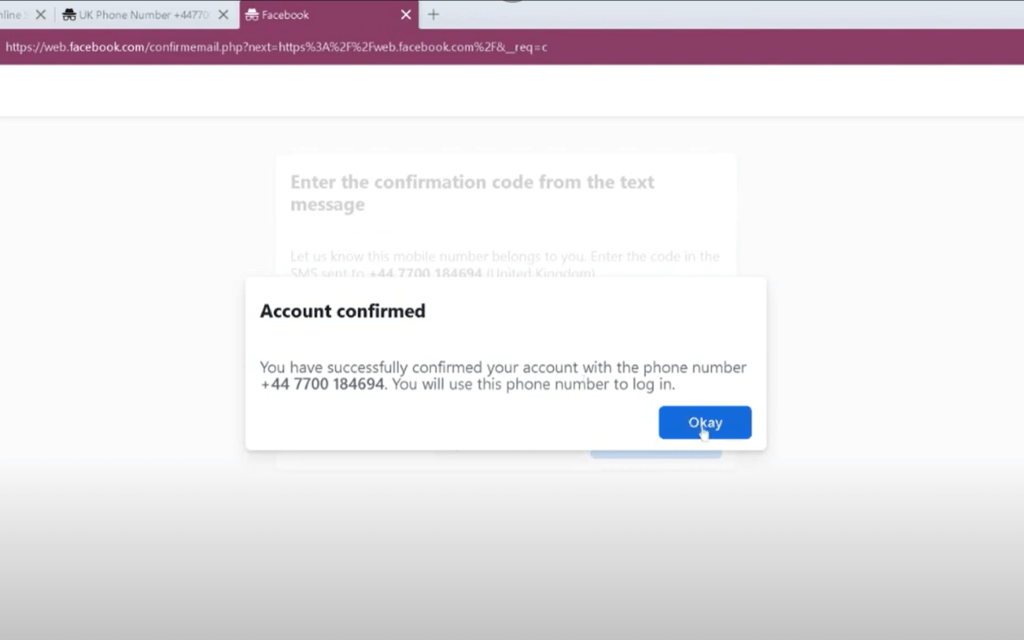
5- Bingo!

Your Create Facebook account Verification code is received successfully, now you can type it in the Facebook verification page to confirm and finalize the registering process.

Receive Temp SMS - create facebook with fake number 4
Create a Facebook account with Fake Mobile Number 27
Receive Temp SMS - create facebook with fake number 3
Create a Facebook account with Fake Mobile Number 28

Receive Temp SMS - create facebook with fake number 2
Create a Facebook account with Fake Mobile Number 29

Video tutorial about how to register a Facebook account with Fake Phone Number:

Thrilling way to create Telegram without phone number

Same as the other social communication and messaging applications such as WhatsApp, Facebook, Google Voice, Tango, and Instagram, Telegram also requires a phone number while creating a new account and registering on their service.

Yet this method saves and prevents the system from creating spam and fraud accounts, it also inconveniences users who might not want to reveal their private phone number due to personal security reasons.

Additionally, some users may wish to use the second account on their Android or iPhone devices, or they may not have a valid SIM card or phone number on their smartphone devices.

As a result, we’ve provided the best method to get your Telegram account without a SIM card or Phone number below.

It’s good to mention that Telegram allows the users to hide their Phone Number and use their nick or user name while using it’s services.

The most convenient and smart way is using temporary and disposable phone numbers.

Tempsmss.com provides its users with an unlimited temp SMS received from all around the world without having any limitations which can be used to verify your new Telegram account.

1- Open TempSMSS website.

TempSMSS can be opened in various monitor devices without any issues such as desktops, laptops and mobile devices.

Receive Temp SMS - open tempsmss.com to get free disposal temp phone number
Thrilling way to create Telegram without phone number 34

2- Choose a Country

On the main page of the TempSMSS website, you can see the different flags of some most popular countries like the US, UK, Canada, Sweden and France. Choose one of them as per your request.

3- Find a Number

After choosing a Country, you have to find and select a proper number which you are seeing in the list of the numbers.

Receive Temp SMS - tempsmss.com choose a phone number to receive free sms disposable temp
Thrilling way to create Telegram without phone number 35

4- Enter the Number in Telegram

Later on, Copy the number in the TempSMSS website and enter it in the Telegram account registering page then press Submit and wait for the message to be received.

5- Bingo!

Your Telegram Verification code is received successfully, now you can type it in the Telegram app to confirm and finalize the registering process.

Receive Temp SMS - tempsmss.com choose a phone number to receive free sms disposable temp usa
Thrilling way to create Telegram without phone number 36

Get new numbers 10 minutes earlier in our Android app

Get it on Google Play

Google Play and the Google Play logo are trademarks of Google LLC.