Create a Claude AI Account Using a Temporary Number

Are you excited to explore the cutting-edge capabilities of Claude AI? Perhaps you’ve heard about its powerful language models and want to dive in. But wait, there’s a catch: the phone number verification requirement. Fear not! In this comprehensive guide, we’ll walk you through how to register for Claude AI using temporary phone numbers, ensuring your privacy and security.

Remember, Claude is here to assist you, whether you’re brainstorming alone or building with a team of thousands. Happy exploring! 🚀🤖

Why Use Temporary Phone Numbers?

Temporary phone numbers provide a layer of anonymity and security that permanent phone numbers do not. They can help you:

  • Protect your personal information: Keep your real phone number private and avoid spam.
  • Try before you share: See how a sign-up works before you give it your own number.
  • Simplify account verification: Verify without handing out your primary number.

Choosing a Reliable Temporary Number Service

Before creating your Claude AI account, you’ll need a reliable temporary number service. Some reputable options include:

  • TempSmss: Offers a wide range of temporary numbers from various countries.
  • Burner: Provides temporary numbers that can be used for multiple purposes.
  • Google Voice: A free service for temporary numbers, though it may require some setup.

For this guide, we’ll use TempSmss due to its ease of use and variety of options.

Step-by-Step Guide to Creating a Claude AI Account with TempSmss

Step 1: Visit TempSmss

Go to the TempSmss website at TempSmss. This service offers temporary numbers from different countries, making it easy to choose one that suits your needs.

Step 2: Select Your Country

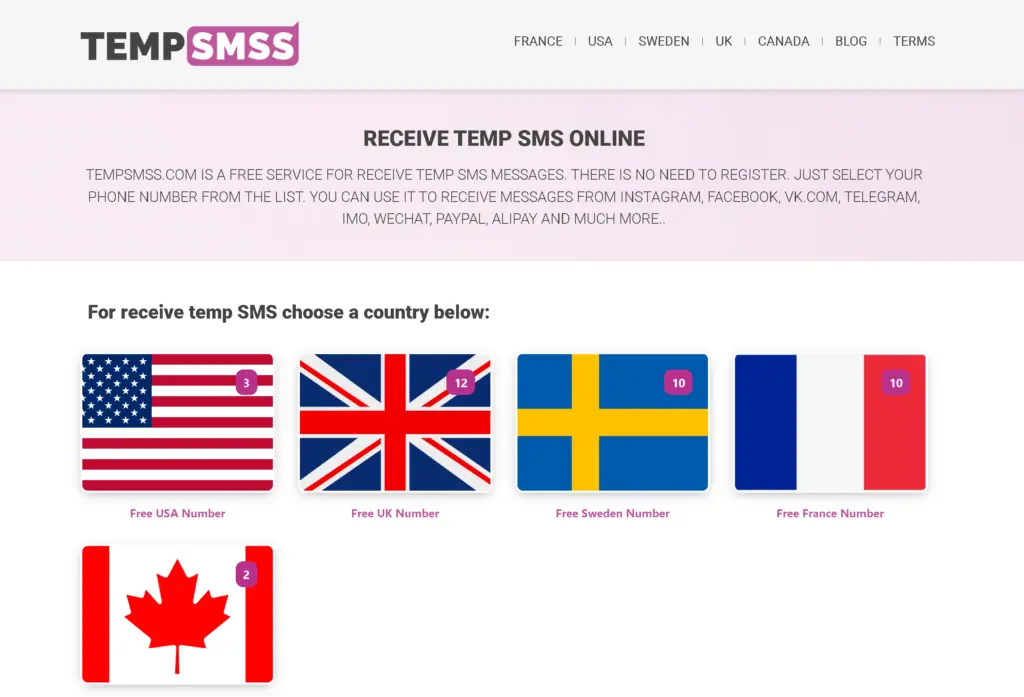
Choose the country from which you want to obtain a temporary number. TempSmss offers options from the USA, Canada, UK, and more. For example:

Step 3: Choose a Temporary Number

Select a number from the available list. Make sure it is active and has not been used for spam or other problematic activities.

Step 4: Register on Claude AI

Go to the Claude AI registration page. Enter the temporary number you obtained from TempSmss when prompted for a phone number. Complete the registration form with the required details.

Step 5: Verify Your Number

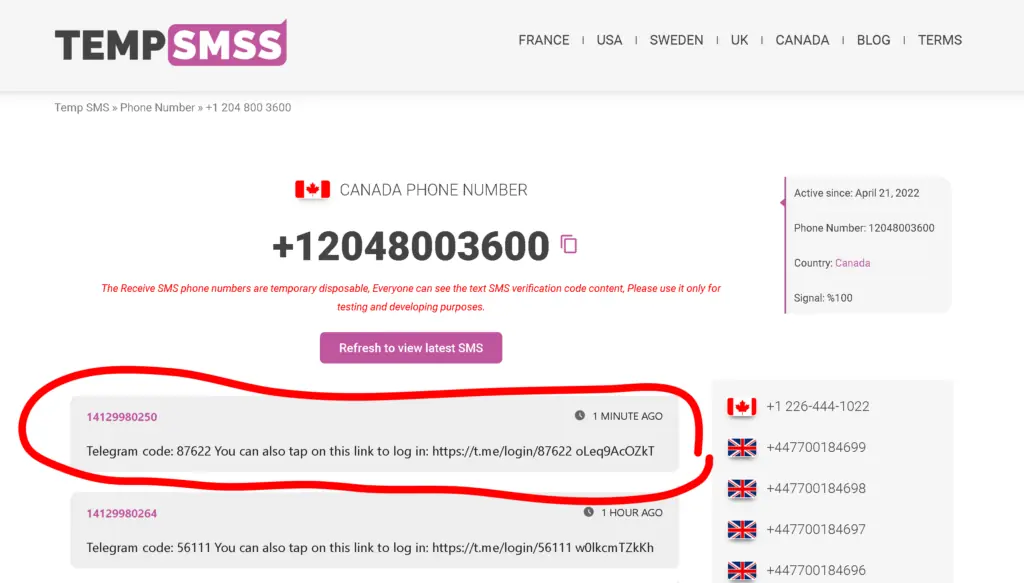
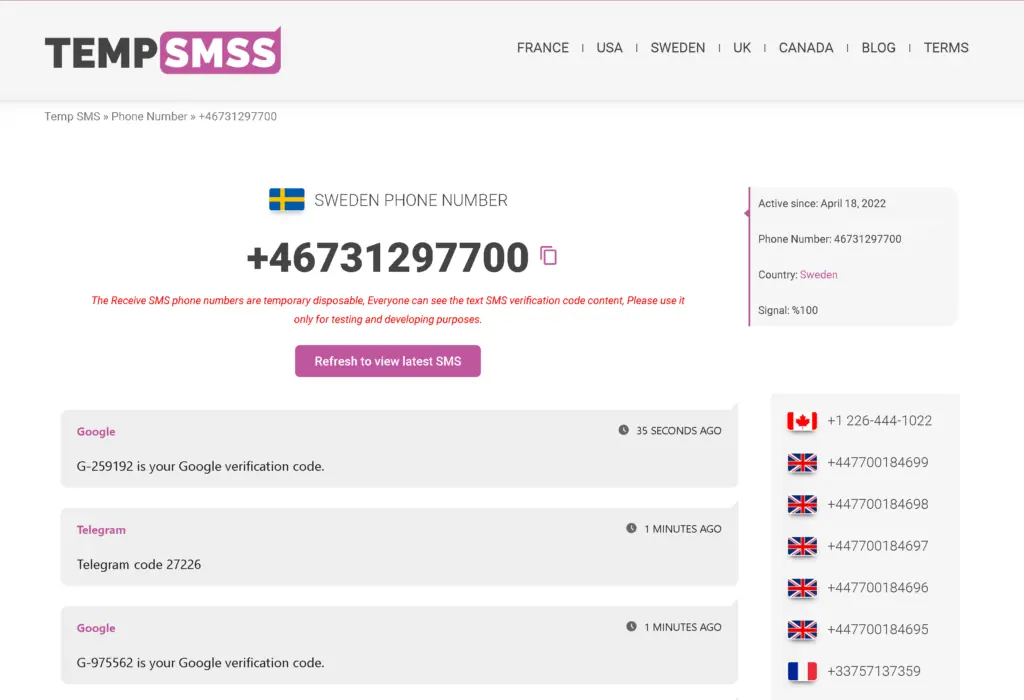
TempSmss will display any incoming messages sent to your temporary number. Wait for the verification code from Claude AI and enter it in the appropriate field on the registration page.

Step 6: Complete Registration

Once your number is verified, complete any remaining steps to finalize your Claude AI account. Congratulations! You now have a Claude AI account using a temporary number.

Why Does Claude AI Require Phone Number Verification?

Before we delve into the solutions, let’s understand why Claude AI insists on phone verification:

  1. Security: Verifying your phone number helps prevent spam, abuse, and fake accounts.
  2. Compliance: It ensures that users are real humans, adhering to Anthropic’s terms of service.
  3. Account Recovery: A verified phone number assists in regaining access if you lose your login credentials.
  4. Two-Factor Authentication: Adds an extra layer of security to protect your Claude AI account.

However, this requirement has unintentionally excluded users from countries where Claude hasn’t officially launched yet. Let’s explore workarounds!

Option 1: Use a Virtual Phone Number Service

One popular method is to use virtual phone number services. These websites provide temporary phone numbers from the US or UK. Here’s how it works:

  1. Open a free UK or US number on TempSMSS.
  2. Select a US or UK phone number.
  3. Use this temporary number during the Claude AI registration process.
  4. Receive the verification code on the virtual number and enter it to complete your registration.

A public number is shared, so use it only for the sign-up and keep your account secured with your own email.

Now, go ahead and create your Claude AI account. The future of AI awaits!

Benefits of Using Temporary Numbers for Online Accounts

Using temporary numbers isn’t just about privacy; it’s about convenience and control. Here are some key benefits:

  • Enhanced Security: Protect your personal information from potential data breaches.
  • Flexibility: Keep your own number out of sign-ups you only need once.
  • Spam Prevention: Avoid unwanted calls and messages to your primary number.
  • Anonymity: Maintain a level of anonymity when signing up for new services.

Using Virtual Phone Numbers for Claude AI 2025

As Claude AI continues to evolve, the importance of secure account creation methods grows. Claude AI 2025 is expected to introduce new features that will make the platform even more powerful. Using virtual phone numbers can help you stay ahead of the curve and protect your information as these updates roll out.

Frequently Asked Questions

Are temporary phone numbers safe to use?

Yes, temporary phone numbers are safe and offer a good level of privacy and security. Just ensure you use a reputable service like TempSmss.

Can I use temporary numbers for all types of online accounts?

Most online services accept temporary numbers for account creation and verification. However, some services might restrict their use, so it’s always good to check their terms and conditions.

How long can I use a temporary number?

The duration a temporary number is active varies by service. TempSmss, for example, offers numbers that can be used for a few hours to several days.

What should I do if a temporary number is not working?

If a temporary number is not working, try selecting another number from the service. Sometimes, numbers may be inactive or already used too frequently.

Can I use a fake number to create a Claude AI account?

Using a fake number can be risky as it might violate the terms of service of Claude AI. It’s better to use a legitimate temporary number from a service like TempSmss to avoid any issues.

Conclusion

Creating a Claude AI account using a temporary phone number is a simple way to keep your own number private. By following these steps and using a reliable service like TempSmss, you can enjoy the benefits of Claude AI without compromising your personal information. Remember, the key to successful online interactions is staying informed and choosing the right tools to safeguard your digital presence.

Ready to create your Claude AI account? Head over to TempSmss to get started with a temporary number today!
Unlock Online Privacy with France Temporary Phone Numbers 2024

In today’s digital age, protecting your online privacy is of utmost importance. Whether you’re signing up for a new app, website, or social media platform, you often find yourself sharing your personal phone number for verification purposes. But what if there was a way to keep your mobile number private while still enjoying the convenience of online services? That’s where France Temporary Phone Numbers come into play.

The Power of France Temporary Phone Numbers

France Temporary Phone Numbers provide a valuable solution to safeguarding your privacy online. At tempsmss.com, we offer a free and convenient service that allows you to receive temporary SMS messages without creating an account. Here’s why these numbers are becoming increasingly popular:

1. No Registration Required

Say goodbye to lengthy registration processes and sharing your personal information. With France Temporary Phone Numbers, you can receive SMS messages instantly, hassle-free.

2. Versatile Usage

Our temporary numbers can be used for a wide range of online services, including Instagram, Facebook, Vk.com, Telegram, Imo, WeChat, PayPal, and many others. Whether you’re signing up for a social media account or verifying an app, these numbers have you covered.

3. Global Accessibility

No matter where you are in the world, you can access France Temporary Phone Numbers. This means you can receive SMS verifications for French-based services from anywhere on the planet.

4. Enhanced Privacy

By using a temporary number, you can shield your actual phone number from prying eyes. This ensures that your personal information remains confidential and protected from potential security breaches.

5. Quick and Easy Verification

The process is as simple as selecting a temporary number from tempsmss.com, using it for verification, and retrieving the verification code from the list of messages associated with that number. Copy and paste the code, and you’re good to go.

How to Use France Temporary Phone Numbers

Using France Temporary Phone Numbers is a straightforward process:

  1. Visit tempsmss.com on your web browser.
  2. Choose a temporary number from the list of available options.
  3. Use this number to sign up for the app, website, or service of your choice.
  4. Return to tempsmss.com to access the verification code sent to the temporary number.
  5. Copy and paste the code into the SMS verification form.
  6. Enjoy the benefits of enhanced privacy and security.

Conclusion

In an era where online privacy is paramount, France Temporary Phone Numbers offer a simple yet effective way to protect your personal information. Whether you’re signing up for social media platforms, messaging apps, or any other online services, these numbers ensure that your real phone number remains confidential. Plus, our service at tempsmss.com is entirely free and accessible from anywhere in the world.

Don’t compromise your privacy online; start using France Temporary Phone Numbers today to keep your personal information safe and secure. Your online privacy matters, and with this innovative solution, you can browse the web with confidence.

You need a temporary number for verification your Twitter? 2022

Do you want to register a second Twitter account, but it requires an SMS verification? Do you not have access to a phone or prefer not to use your personal number?

Use TempSMS’s “Temporary number to receive SMS” service! You’ll get a free virtual phone number. You can use it for registration and you won’t have to pay anything.

When registering on a website, you may be asked to provide your mobile phone number. It’s possible that you’ll end up with a slew of text messages later. We’ll assist you in registering on any website without having to give out your real phone number. You won’t have to be concerned about your real phone number. We’ll keep you safe from spam and unwelcome advertising.

Register for a Twitter account without a phone number

You don’t have to give Twitter your phone number just yet if you want to sign up. Check out this tutorial on how to make a Twitter account without using your phone number:

  • Visit the Twitter signup page.
  • Click on “Sign up with phone or email” button.
  • Fill in your name here.
  • Under Phone, select Use Email Instead.
  • Tap Next after entering your date of birth.
  • Hit Sign Up button.
Receive Temp SMS - image 2022 06 21 145722382
Twitter Sign Up Page

Instead of sending a verification code to your phone, Twitter sends it to your email address. You simply enter the code and click “Sign Up” and you’re done.

Unfortunately, Twitter’s attempt to obtain your phone number may not be over yet. Many users who haven’t entered their phone number claim that Twitter has locked them out of their accounts and that phone number requests keep popping up.

Don’t worry — we’ll walk you through all of your options so you can avoid revealing your phone for good.

Why is Twitter requesting your phone number?

Twitter, like many other social media platforms, claims to require your phone number for your own benefit. The following are some of the reasons for requiring users’ phone numbers:

  1. Identity verification
  2. demonstrating that you are not a robot
  3. Maintaining the security of your account
  4. Resetting your password is simple.
  5. assisting your friends in locating your account
  6. Using Twitter to communicate with your phone contacts
  7. Using security features such as two-factor authentication
  8. Making it difficult for spammers and suspicious accounts to continue operating

How can I get an SMS verification code from Twitter online?

  1. Navigate to our website’s main page to begin receiving SMS online.
  2. Choose the desired country and look for the service number in the list.
  3. Make a note of the temporary number that appears there. Copy it and paste it into the appropriate field in the verification window before sending the SMS code.
  4. You’ll receive a code to confirm your Twitter registration in a few seconds. The text message will appear next to your phone number.

How to receive SMS for free?

We do not have any paid phone numbers, so all of the numbers on our website are free. People contact us every day looking for paid SMS numbers.

We always decline their requests because we value our own telephone numbers. We want to work in a long-term manner. However, we run promotions and give out promo codes through our Telegram channel.

Verification Twitter Registration tempsmss.com

A temporary number protects your online privacy

Use TempSMSs.com instead of your personal or work phone number online to protect your online privacy! Other websites can also send text messages to our SIM card numbers.

Countries have dedicated SMS verification numbers:

CountryLink
USView US temp numbers
UKView UK temp numbers
FranceView French temp numbers
SwedenView Swedish temp numbers
CanadaView Canadian temp numbers

Create a WhatsApp Account With a Temporary Phone Number

WhatsApp is one of the most used messaging apps in the world, and it asks for a phone number when you sign up.

Its trick is that for authorization, you don’t need a login or a password; all you need is a phone number. You can use online temporary numbers for WhatsApp because having a working SIM card is required to launch and use the messenger.

You can register in WhatsApp without using your personal phone number, but you can use a temporary phone number for free. This will be covered in our article.

WhatsApp enables businesses to communicate with their customers in real time and around the clock. As a communication channel, it increases both company loyalty and the likelihood of purchasing goods or ordering services.

And, if you use the right strategy, you will be able to shape the client’s perception of his close communication with the brand as if it were one of his friends.

The WhatsApp Business app is free for users who own small and medium-sized businesses. With its assistance, you can consult, receive feedback on the company’s work and the quality of goods/services, notify about the status of the order, and answer questions.

Thus we understand that WhatsApp is a true virtual assistant through which businesses can not only communicate with customers and provide information about goods or services, but also create catalogs and use special tools that allow for the configuration of automatic responses and the sorting of messages.

The product/service catalog card contains additional information such as the price, description, and so on. The most frequently asked question is how to create a WhatsApp account without a mobile phone. There is absolutely no way without a number.

You cannot use WhatsApp without first registering: in order to call and send text messages through this messenger, you must have a profile that is authorized and linked to a phone number.

Additional profiles are required to send text messages or make automatic phone calls. If you want a WhatsApp account that is not tied to your own number, a temporary number can receive the code. Anyone can read the messages on a public number, so do not use one for an account you need to keep.

How to Create a WhatsApp Account Using a Temporary Phone Number

A temporary phone number allows you to fully bypass SMS verification and authorize your WhatsApp account. Because the number is linked and checked only once in the messenger, there is no need to keep it active after that.

As a result, registering for a temporary phone number is a useful and convenient service. Use the extensive options provided by the service https://tempsmss.com to use a mobile number for registration.

Visitors can use free temporary phone numbers from more than five countries, including the United States, Canada, the United Kingdom, and France.

You can use numbers with various prefixes to receive SMS with a confirmation code from WhatsApp. Furthermore, the cost of online numbers is zero for WhatsApp registration.

How to Get a Free WhatsApp Virtual Number

In addition to free temporary phone numbers, https://tempsmss.com offers free phone numbers for SMS verification.

These are specific numbers to which you can send text messages for free without creating an account on the site.

Create WhatsApp With Temporary Phone Number
Create a WhatsApp Account With a Temporary Phone Number 1

Any SMS, except those from payment systems, is delivered to such an online sim card. Another advantage is the ability to receive repeated SMS messages to the same number by clicking the “Update” button on the website in the incoming messages window.

WhatsApp limits how many accounts one number can register. If a code does not arrive, try a number that received a WhatsApp SMS recently.

The tempsmss.com service is a must-have for online SMS activation. On the website, you can acquire a free virtual phone number that will allow you to complete the Facebook registration fast and easily right now for the price of 0 cents!! To get Free Temp SMS to UK, England, Canada mobile number for verification or any of countries available on the service, perform the following:

1- Open TempSMSS.com

TempSMSS can be opened in various monitor devices without any issues such as desktops, laptops and mobile devices.

Receive Temp SMS - open tempsmss.com to get free disposal temp phone number

2- Choose a Country

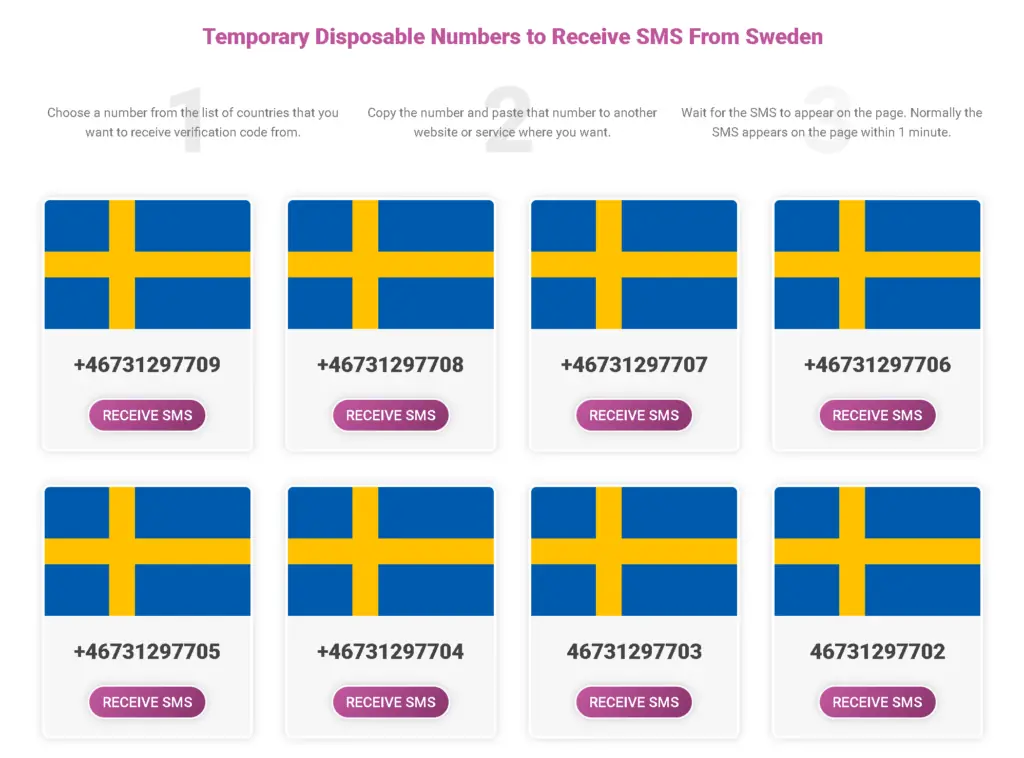
On the main page of the TempSMSS website, you can see the different flags of some most popular countries like the US, UK, Canada, Sweden and France. Choose one of them as per your request.

3- Find a Number

After choosing a Country, you have to find and select a proper number which you are seeing in the list of the numbers.

Receive Temp SMS - tempsmss.com choose a phone number to receive free sms disposable temp

4- Enter the Number in WhatsApp

Later on, copy the number in the TempSMSS.com website and paste it in the WhatsApp App verification page then press Submit and wait for the message to be received.

Your WhatsApp account Verification code is received successfully, now you can type it in the WhatsApp verification page to confirm and finalize the registering process.

Receive Temp SMS - create facebook with fake number 4

Create a Signal Account with Temporary Phone Number

Signal Private Messenger is a well-known encrypted message exchange platform. Even the owners of Signal cannot see the private exchanged text messages and the information of the messenger users due to the special data transfer protocol.

Different than Telegram, all messages are encrypted in the app, not just those sent in anonymous chats. Anyone interested can access the Signal source code on GitHub.

To begin using the Signal messenger, download the app and enter your phone number to which a confirmation code will be sent.

Signal has been in business since 29 July 2014. The App’s popularity skyrocketed after WhatsApp revised its privacy policies: because data is transferred to Facebook, anonymity is no longer an option.

Then people began to look for an alternative and came across the Signal messenger, which was praised by prominent figures such as Edward Snowden and Jack Dorsey.

It is impossible to use Signal messenger without account verification: the only question is which number will receive the code. Privacy enthusiasts will prefer the option in which the personal number is not used. And there is a way to do it.

Signal Messenger, like Viber, WhatsApp and other VOIP apps, verifies users by sending a six-digit verification code to their phone number.

To get your Free Signal Private Messenger Account, you’ll need a use phone number that can receive text messages, phone calls, or both.

In this article, we’ll show you how to create a Signal account without using your own phone number.

The Functionality of Signal and Oddities

The messenger is used to send text and voice messages, as well as voice and video calls. It is also possible to send photos, emoticons, videos, and stickers. Group chats (up to 1100 people) are available for corporate communication.

Signal employs E2EE encryption technology, which encrypts transmitted data without sending it to remote servers. Except for the chat participants, no one will have access to the messages (even Signal owners). As a result, any outside intervention is impossible.

Signal developers have added the option of automatically removing photos and videos a few seconds after viewing to increase privacy.

Get Virtual Temporary Phone Number from Signal

It is simple to use a virtual number to receive SMS from Signal. We’ve put together a step-by-step guide to help you figure it out.

Step #1: Get and install Signal Private Messenger.

Download the Signal Private Messenger App for Android from this link in Google Play Store and download the App from the App Store if you have an iPhone in this link. Also download Signal Messenger for windows OS directly from this link.

Install Signal by following the instructions and granting the App permission to access your Contacts and send you notifications.

Step#2. Verify Signal Using Temp Phone Number

After installing the app, open the Signal Private Messenger app in your mobile phone and follow the steps of the number verification stage. In the section of your phone number you will write the number which you get from tempsmss.com website and paste it there.

Step#3. Check the website to view received verification code

After entering the mobile phone to the Signal Private Messenger app to verify your account. You have to wait 1-2 seconds on the page which you copied the mobile number in.

Refreshing the page is required to see last received SMS from apps like Signal, Instagram, Facebook and so on. By refreshing the page you will be able to see the 6-digit verification code of the Signal account. Copy the code and paste it in your Signal App phone.

Receive Temp SMS - create facebook with fake number 4
Create a Signal Account with Temporary Phone Number 2

The instructions provided are applicable to other websites and applications. There are numbers for almost all known countries and operators on the client’s selection.

This opens up the possibility of registering on foreign websites and applications that are not available in some countries.

Create a Facebook account with Fake Mobile Number

To begin with, this is an essential working tool for target experts, SMM, and other digital marketing professionals that are heavily involved in advertising on this platform. This post will explain how to obtain an infinite amount of phone numbers to receive SMS online in a simple and legal manner.

Bypass Facebook verification with fake number

Creating Facebook accounts in the worldwide social network, continues to break world popularity records. According to 2022 statistics:

  • 2,3 billion (MAU) monthly active users;
  • 2,14 billion (DAU) daily visits;
  • 500 new registrations per minute;
  • 100+ million business pages;
  • and 90,2% of Internet marketers utilize Facebook.

As a result, it is not unexpected that more than 2 million businesspeople from all over the world have praised Facebook’s commercial appeal. And you should agree that this is a vast area of possibilities.

If you need to create multiple new accounts quickly, a virtual phone number is ideal. Webmasters, target specialists, and other advertising and marketing professionals frequently require this.

Ordinary users, however, are frequently faced with the need to obtain an internet number in order to evade Facebook phone verification.

There might be a variety of motives, ranging from the goal to obtain a new public unconnected to the original one, to the ban’s banal circumvention, to the desire to earn.

For example, for account registration and selling, or for the development and management of news sites. By the way, these ways of monetization are growing more appealing, according to the earn.

Professionals propose the SMS verification service TempSMSS to obtain a virtual number for SMS from Facebook.

How to get a free fake number for Facebook verification

The tempsmss.com service is a must-have for online SMS activation. On the website, you can acquire a free virtual phone number that will allow you to complete the Facebook registration fast and easily right now for the price of 0 cents!!

To get SMS to a fake UK, India, Pakistan, Russia, Vietnam, England, Vietnam, Indonesia, Cambodia, Thailand, Philippines mobile number for Facebook verification or any of the different countries available on the service, perform the following:

1- Open TempSMSS.com

TempSMSS can be opened in various monitor devices without any issues such as desktops, laptops and mobile devices.

Receive Temp SMS - open tempsmss.com to get free disposal temp phone number
Create a Facebook account with Fake Mobile Number 3

2- Choose a Country

On the main page of the TempSMSS website, you can see the different flags of some most popular countries like the US, UK, Canada, Sweden and France. Choose one of them as per your request.

3- Find a Number

After choosing a Country, you have to find and select a proper number which you are seeing in the list of the numbers.

Receive Temp SMS - tempsmss.com choose a phone number to receive free sms disposable temp
Create a Facebook account with Fake Mobile Number 4

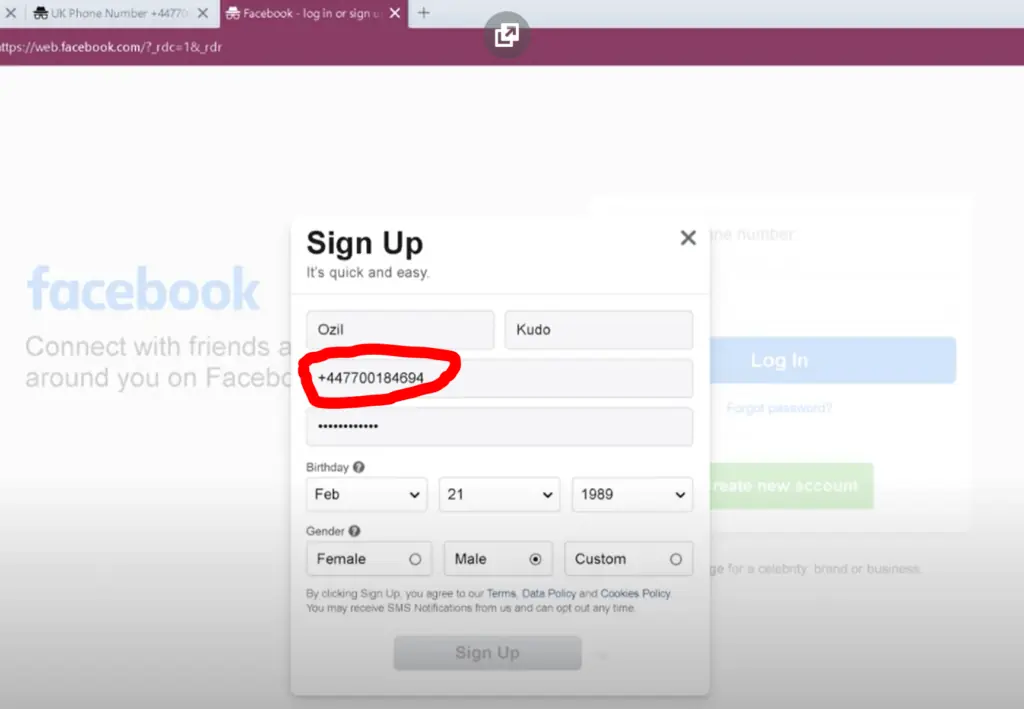
4- Enter the Number in Facebook

Later on, copy the number in the TempSMSS.com website and paste it in the Facebook verification page then press Submit and wait for the message to be received.

Create Facebook account

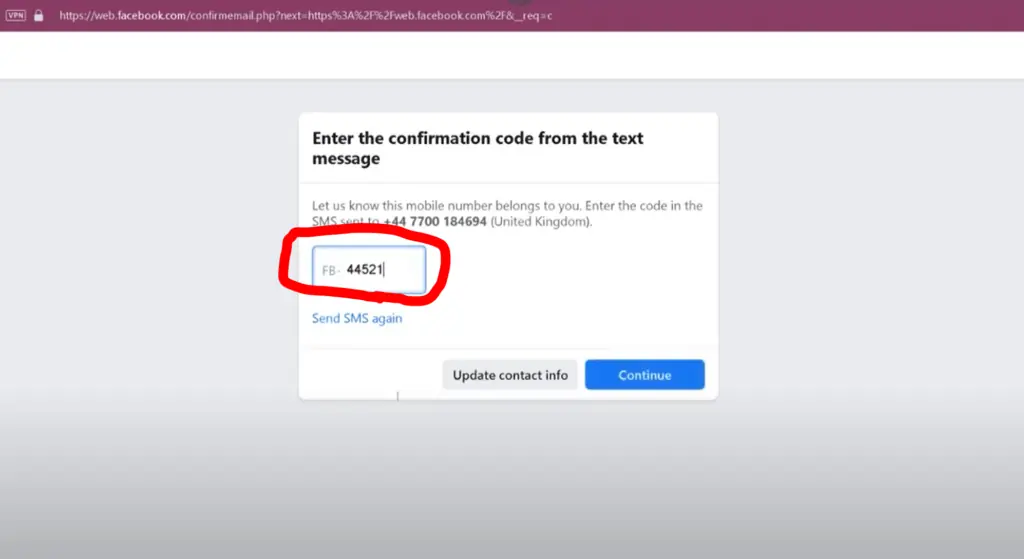
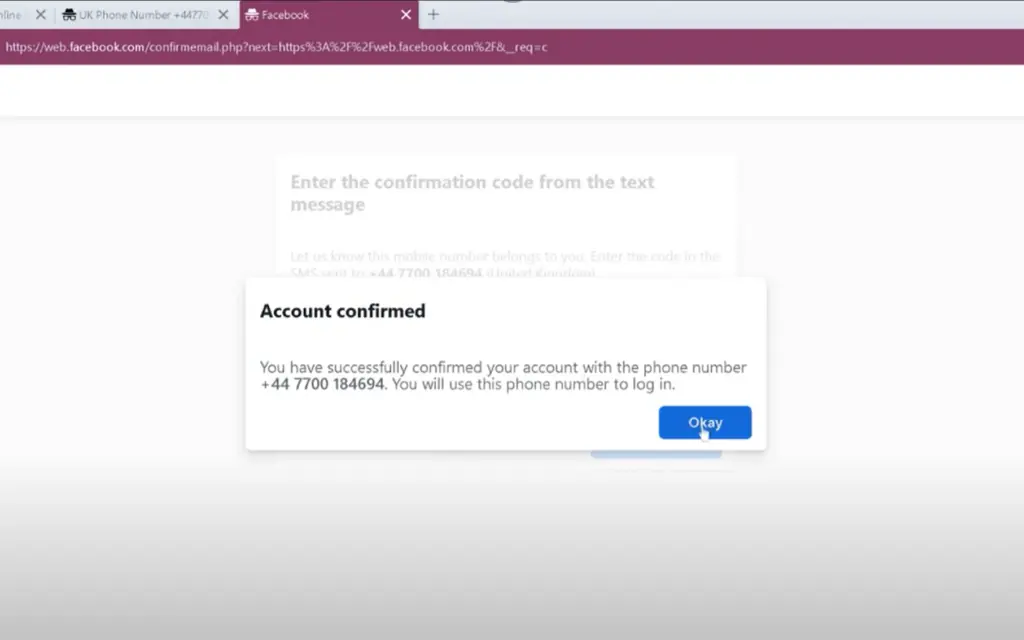
5- Bingo!

Your Create Facebook account Verification code is received successfully, now you can type it in the Facebook verification page to confirm and finalize the registering process.

Receive Temp SMS - create facebook with fake number 4
Create a Facebook account with Fake Mobile Number 5
Receive Temp SMS - create facebook with fake number 3
Create a Facebook account with Fake Mobile Number 6

Receive Temp SMS - create facebook with fake number 2
Create a Facebook account with Fake Mobile Number 7

Video tutorial about how to register a Facebook account with Fake Phone Number:

Fast way to Create Snapchat Without Phone Number 2022

This service is the second most popular in the United States, trailing only Facebook. Since its inception in 2011, the daily audience has increased to 319 million active users.

The core idea behind Snapchat is that communicated materials (snaps) vanish after 10 seconds of viewing and are not saved in your phone, account, or anywhere else on the network.

The popular “Stories” feature is a collection of snaps that are visible to all subscribers and self-destruct after 24 hours. Users can also go about their daily lives. Instagram eventually took over these concepts and offered services that were nearly equivalent.

Because of the big daily coverage, multiple top brands have Snapchat accounts, which is useful.

Owners give out promo codes, discounts, and prizes, and provide subscribers with unique previews of new products. All of this promotes user trust and interest, which helps to recruit new consumers and strengthen connections with returning customers.

Get Temp Number for verify Snapchat account

A mobile number is essential for Snapchat registration in order to validate your identity. It is not always practical to attach your actual phone number—the profile will be highlighted in the references of acquaintances.

There is also a possibility of data leakage: fraudsters and advertising firms uncover and add numbers to the database, then phone customers and try to impose unwanted services, or fraudulently possess bank card data.

Temp numbers will assist in resolving this issue. There is no need to place a SIM card into your smartphone to use these numbers. The Snapchat SMS verification process is completed online.

Temp numbers will assist you in creating an account anonymously and protecting yourself from unwanted attention and spam.

Furthermore, if a person currently has a profile and needs to create another, the service to receive SMS online is useful.

A large number of profiles allows for greater coverage and the sending of advertising messages to other users without risk of the primary profile being blocked.

Receiving SMS online works in the same way as it does on a traditional phone: a code arrives in the message, allowing you to create a full-fledged Snapchat account.

The only difference is that the entire process is carried out through the website tempsmss.com, where the client selects an appropriate number and uses it for free for an unlimited time.

1- Open TempSMSS website.

TempSMSS can be opened in various monitor devices without any issues such as desktops, laptops and mobile devices.

Receive Temp SMS - open tempsmss.com to get free disposal temp phone number
Fast way to Create Snapchat Without Phone Number 2022 8

2- Choose a Country

On the main page of the TempSMSS website, you can see the different flags of some most popular countries like the US, UK, Canada, Sweden and France. Choose one of them as per your request.

3- Find a Number

After choosing a Country, you have to find and select a proper number which you are seeing in the list of the numbers.

Receive Temp SMS - tempsmss.com choose a phone number to receive free sms disposable temp
Fast way to Create Snapchat Without Phone Number 2022 9

4- Enter the Number in Telegram

Later on, Copy the number in the TempSMSS website and enter it in the Telegram account registering page then press Submit and wait for the message to be received.

5- Bingo!

Your Snapchat Verification code is received successfully, now you can type it in the Telegram app to confirm and finalize the registering process.

Receive Temp SMS - tempsmss.com choose a phone number to receive free sms disposable temp usa
Fast way to Create Snapchat Without Phone Number 2022 10

Thrilling way to create Telegram without phone number

Same as the other social communication and messaging applications such as WhatsApp, Facebook, Google Voice, Tango, and Instagram, Telegram also requires a phone number while creating a new account and registering on their service.

Yet this method saves and prevents the system from creating spam and fraud accounts, it also inconveniences users who might not want to reveal their private phone number due to personal security reasons.

Additionally, some users may wish to use the second account on their Android or iPhone devices, or they may not have a valid SIM card or phone number on their smartphone devices.

As a result, we’ve provided the best method to get your Telegram account without a SIM card or Phone number below.

It’s good to mention that Telegram allows the users to hide their Phone Number and use their nick or user name while using it’s services.

The most convenient and smart way is using temporary and disposable phone numbers.

Tempsmss.com provides its users with an unlimited temp SMS received from all around the world without having any limitations which can be used to verify your new Telegram account.

1- Open TempSMSS website.

TempSMSS can be opened in various monitor devices without any issues such as desktops, laptops and mobile devices.

Receive Temp SMS - open tempsmss.com to get free disposal temp phone number
Thrilling way to create Telegram without phone number 11

2- Choose a Country

On the main page of the TempSMSS website, you can see the different flags of some most popular countries like the US, UK, Canada, Sweden and France. Choose one of them as per your request.

3- Find a Number

After choosing a Country, you have to find and select a proper number which you are seeing in the list of the numbers.

Receive Temp SMS - tempsmss.com choose a phone number to receive free sms disposable temp
Thrilling way to create Telegram without phone number 12

4- Enter the Number in Telegram

Later on, Copy the number in the TempSMSS website and enter it in the Telegram account registering page then press Submit and wait for the message to be received.

5- Bingo!

Your Telegram Verification code is received successfully, now you can type it in the Telegram app to confirm and finalize the registering process.

Receive Temp SMS - tempsmss.com choose a phone number to receive free sms disposable temp usa
Thrilling way to create Telegram without phone number 13

Create Gmail account with Virtual Phone Number

This post will explain how the TempSMS verification service can allow you to register Gmail accounts without using your personal phone number and create an unlimited number of accounts.

When registering on Gmail, you must submit a phone number to which an SMS with a verification code will be sent.

The user is required by the company’s guidelines to associate a phone number with each different account. A Google profile grants access to a number of services, including Gmail, Google Play, and Google Maps.

The ability to utilize a personal phone number is not appropriate for every user. Some people require many personas, while others simply do not want to jeopardize their privacy.

One approach solves both problems: Google rents virtual numbers.

Mobile number for Gmail Account verification

The tempsmss.com service allows you to create accounts on the most popular websites like Gmail, Facebook, Instagram, Telegram, and other mobile applications without providing your personal mobile number.

Create Gmail with temp Number verification

It works by the user discovering free temporary numbers, entering them during page registration, and receiving an SMS with a verification code.

These numbers are less expensive than real SIM cards. For example, Canada, Sweden, the United States, France, and all other nations have no entry fees.

You can use our numbers as many times as you like. For example, you want to create two Gmail accounts: one for your personal use and the other one for your business use.

Then you’ll need two Google accounts and two disposable phone numbers. The entire process, including number acquisition, should take a few minutes. Rep the steps in the instruction in the following subsection.

Create more than one Gmail account in 5 steps

To obtain a free virtual number and complete account registration on Gmail, follow the step-by-step instructions.

1- Open www.tempsmss.com and choose the country which you want to get a number from.

2- Get a Disposal phone number from the list.

Receive Temp SMS - open tempsmss.com to get free disposal temp phone number

3- Copy the temporary phone number by clicking on copy icon.

4- Paste and use it while reregistering your Gmail account..

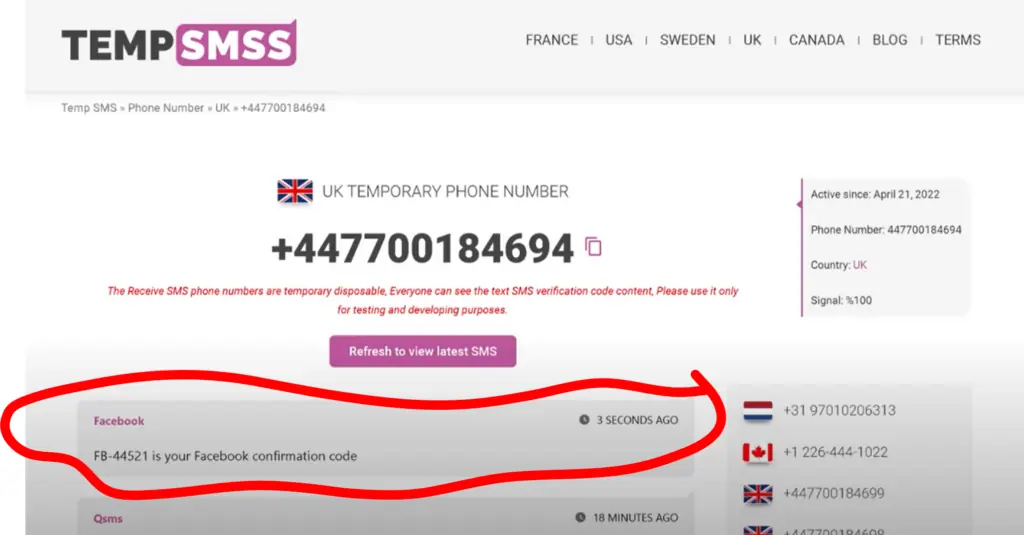
5- Then come back to the tempsmss.com website and refresh the page. You will see that your received SMS verification code is there.

Receive Temp SMS - temp sms receive temporary sms mobile phone number tempsmss.com

Create GeeGee account by a temp number in 2 mins

Have you ever thought of creating another GeeGee.net account to use and benefit from the website? In this article we showed how to register a new account on geegee.net In the following video tutorial. By using Temp Number you can get your new GeeGee account instantly.

What is GeeGee.net?

GeeGee‘s main focus is on gaming monetization and money gamification.

The platform will be a subscription-based web service that connects and monetizes all users and content across all social media and content-hosting platforms.

We want to provide a viable alternative to the present industry models.

Why create a second account with temp numbers?

You might be wondering why we don’t mind if you create a fake GeeGee account, especially if you’re selling something on GeeGee or have a business account.

Here are a few reasons why creating a false account is preferable.

Privacy (Makes You Anonymous)

Protecting your privacy is one of the most serious concerns facing the general public in today’s digital environment. When you provide private info, such as your real phone number, you risk identity theft, cyberstalking, and other unwelcome attention.

You may protect yourself from all of this and more by using disposable phone temp numbers for SMS when signing up for internet services.

Suitable (It is Convenient)

The secret to using tempsms and temp numbers is that they are simply that: temporary and disposable. You use one if you need it – say, to create an account on the internet – and then put it away when you don’t.

Because of their short duration, these numbers will expire soon after the service you requested is finished. Do you require a different phone number for future sign-ups? Simply acquire a new phone number!

No Spam (Removes Spam)

For better or worse, once you give a corporation your mobile number, you are on their mailing list. Some companies’ terms of service allow them to utilize your personal information for marketing reasons.

In the real world, this translates to a never-ending barrage of spam texts delivered directly to your phone. Your phone number may be shared with third parties in some instances (again, as you permitted when agreeing to their terms of service).

You’ll never have to worry about follow-up marketing with a throwaway temp number for SMS.

Globally Accepted (Recognized Worldwide)

Many providers don’t bother to check if the phone number you offer is for a real phone or a virtual mailbox. If you obtain their verification code, you will be able to proceed to their main site without any additional obstacles.

You can use our tempsms online to receive temporary SMS to sign up for some of the world’s most popular internet services. Facebook, Telegram, Instagram, WhatsApp, Webmoney, Twitter, Gmail, Baidu, Amazon, Tinder, Chatroulette, eBay, LinkedIn, and other social media platforms are among them.

Temp SMS
Create GeeGee account by a temp number in 2 mins 14

Is tempsmss.com good to use?

Using tempsms website is a financially savvy and secure method for safeguarding yourself on the web.

It is set up for a brief time (typically just a month or two) to allow you to satisfy any service provider verification requirements.

After then, the temp number is no longer active, which means no further SMS correspondence from the provider or a third-party.

Get new numbers 10 minutes earlier in our Android app

Get it on Google Play

Google Play and the Google Play logo are trademarks of Google LLC.